Your best developer just became obsolete. Not the way you think. Nobody's getting fired. But the mid-level engineer who spent her career writing perfect CRUD operations? The senior who architected every API route manually? The QA specialist who caught regressions by clicking through flows? Their work just got cheaper.
Not because they got worse. Because machines got better at the boring parts.
Here's what shifted:
- 84% of developers now use AI tools daily.
- 92% of code suggestions get accepted without modification.
- Lines of code per developer jumped 76% in a single year.
Teams restructuring around this are shipping twice as fast and spending half as much.
The question isn't whether AI saves money anymore. It's whether you're willing to restructure your team to capture it. Here's what you need to know.
Hire AI-ready developers on Index.dev! Get access to vetted engineers who are productive with GitHub Copilot, Claude, and Amazon Q on day one.
The Math is Undeniable
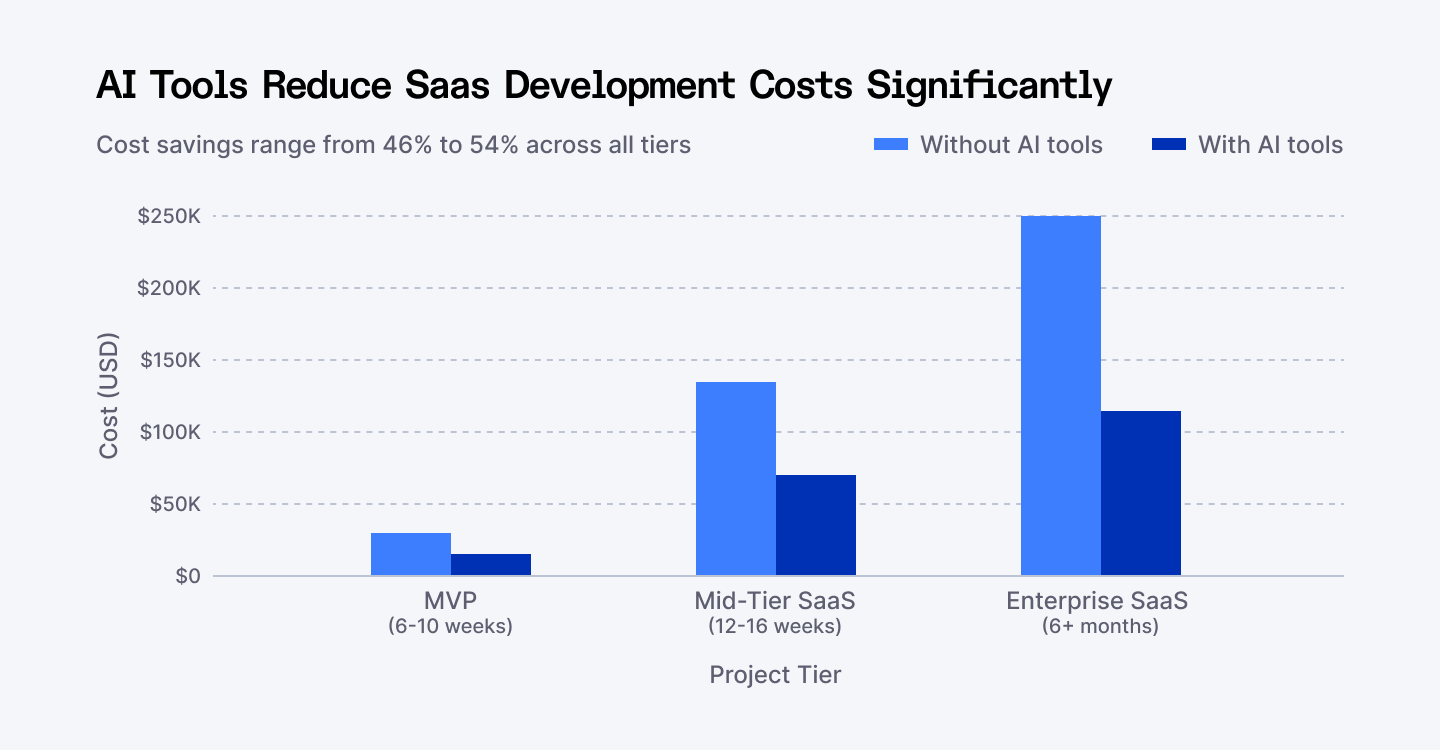
SaaS Development Cost Comparison: With vs Without AI Tools (2026)
MVP costs dropped from $25K to $12-15K. Mid-tier SaaS went from $150K to $70-90K.
Enterprise builds that needed $250K now run $115K. Not because the work got easier. Because 60-70% of that work doesn't need humans anymore.
This is what's happening on production systems right now.
What Actually Changed
Before 2026, code work broke into two categories:
- The kind only humans could do (architecture, debugging, security).
- The kind humans were forced to do (boilerplate, test scaffolding, documentation).
AI compressed the second category from weeks into hours.
GitHub Copilot writes your API routes. Claude handles your architecture questions. Amazon Q Developer generates your AWS infrastructure.
A task that used to take a junior two weeks? Done in a day now. The code quality is often better because AI doesn't get lazy about edge cases.
The hiring equation flips immediately. You either skip hiring that role entirely, or redeploy whoever would have done it to something that actually requires thinking.
The second thing that shifted: code review moved partially into automation. Greptile and Sourcegraph Cody catch mistakes before humans review them. Your seniors stop reviewing obvious stuff and start reviewing architecture decisions.
Quality stays high. Speed stays high. Risk drops.
This is what cost reduction actually looks like: not replacing people, but replacing the work that made them slower.
The Real Numbers (2026 Data)
Here's what real SaaS teams are spending now.
MVP Tier (6-10 weeks)
- With AI tools: $12K–$18K
- Without: $25K–$35K
One engineer with Copilot ships what two engineers used to. Pre-built no-code platforms (Glide, Softr) handle dashboards without backend code. Infrastructure footprint shrinks because you're not provisioning for a team.
Mid-Tier SaaS (12-16 weeks)
- With AI tools: $50K–$90K
- Without: $120K–$150K
The win here: AI test automation.
Tools like Testim and Autify generate test cases from user workflows. You don't need a dedicated QA specialist right away. Infrastructure-as-code generation (Copilot + Terraform) cuts DevOps setup from weeks to days.
Enterprise SaaS (6+ months)
- With AI tools: $80K–$150K
- Without: $200K–$300K+
Enterprise wins on scale and governance. Data documentation is generated automatically. Security checks run continuously.
Infrastructure audits happen via Amazon Q, which flags misconfigurations in real-time. Technical debt doesn't pile up because nothing gets shipped without explanation.
The pattern repeats: AI saves most on repetitive work. It saves least on architectural decisions and debugging unfamiliar code. But repetitive work is where budgets hemorrhage.
Where AI Works (And Doesn't)
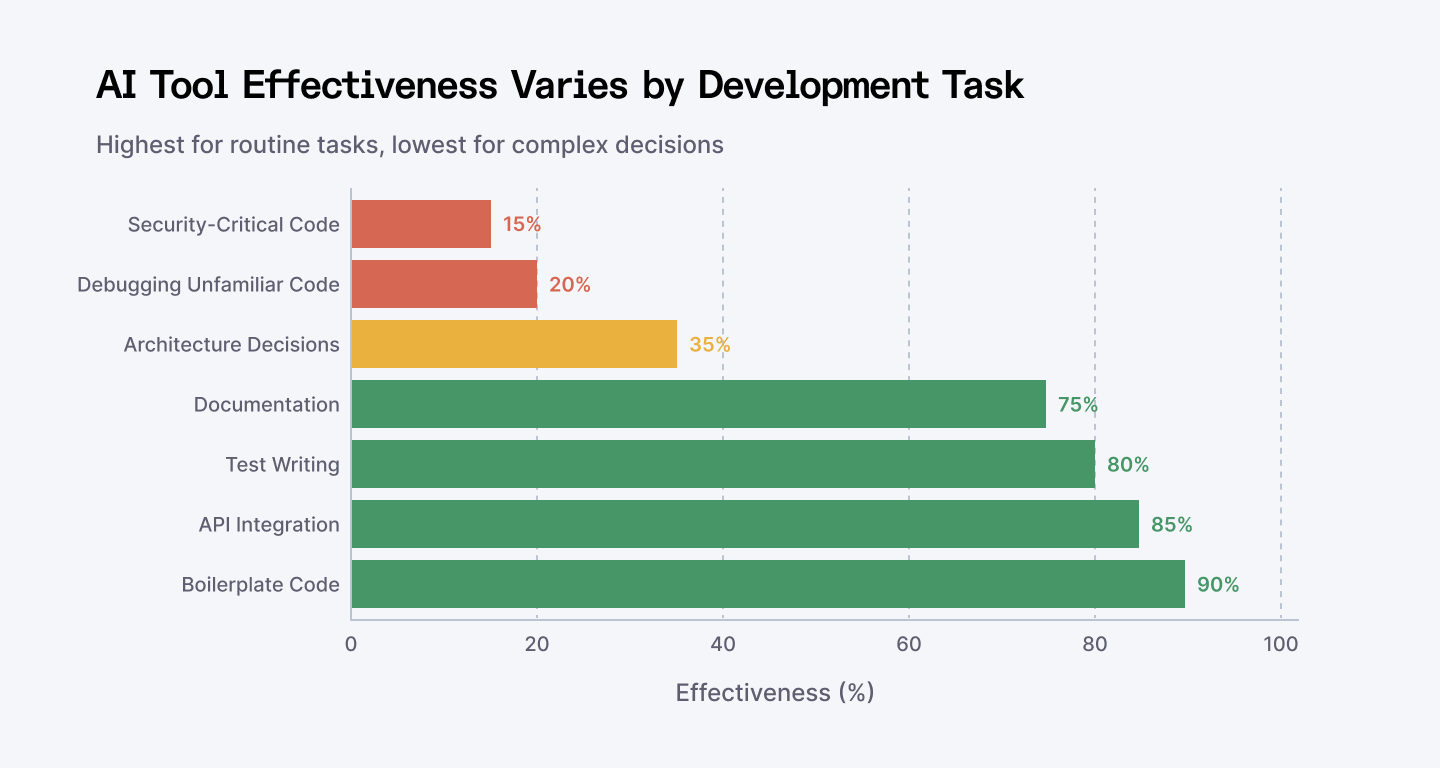
Where AI Tools Actually Save Time (Task-by-Task Breakdown)
Not all tasks benefit equally from AI. Knowing where AI wins and where it loses is the difference between 20% savings and 50% savings.
High-win tasks (75-90% time savings)
- Boilerplate code
- API integration
- Test writing
- Documentation generation
This is where AI shines. Give it a problem that follows a pattern and watch it work.
This is where you capture the biggest savings.
Medium-win tasks (35-75% savings)
- Database schema design
- Refactoring
- Code review assistance
AI helps here, but humans still drive decisions. You're faster, not automated.
Low/no-win tasks (15-35% savings)
- Architecture decisions
- Debugging subtle bugs
- Security-critical code
AI is slower here. Experienced developers with unfamiliar code take 19% longer with AI assistance. Your seniors still do these solo.
The Tools Worth Using (And Why)
1. GitHub Copilot
Code completion. Works in every language and editor. 92% acceptance rate. Fast. Dumb.
- Best for: boilerplate, tests, API integration, documentation.
- Cost: $10-20/month per developer.
- ROI: immediate for teams shipping fast.
The catch: slow on architecture decisions. If you're redesigning a system, Copilot makes you slower. Experienced engineers on hard problems take 19% longer according to METR research.
But on routine work? 2-4x faster.
2. Claude (via API)
200K token context window. Understands your entire codebase at once. Expensive per query, worth it for hard problems.
- Best for: Architecture decisions, legacy refactoring, system explanations
- How to use it: Pair with Copilot. Copilot handles speed. Claude handles thinking.
3. Amazon Q Developer
Native AWS integration. Understands IAM, Lambda, CloudFormation automatically. Healthcare company Availity reported 33% of production code generated by Q.
- Best for: AWS-heavy teams (80%+ of infrastructure)
- Cost: $19/month for Q Developer Pro
- Why it wins: AWS context means fewer questions, faster scaffolding.
4. Cursor
Multi-file context. Fastest response times (320ms vs 890ms for Copilot). New, winning market share.
- Best for: Full-stack work requiring rapid iteration
- Cost: $20/month
Real advice: choose based on your stack, not hype. AWS teams start with Amazon Q. Multi-cloud teams stay with Copilot. Teams doing deep reasoning pair Copilot with Claude.
Explore top alternatives to GitHub Copilot that can speed up your coding workflow.
How AI Changes Your Team Structure
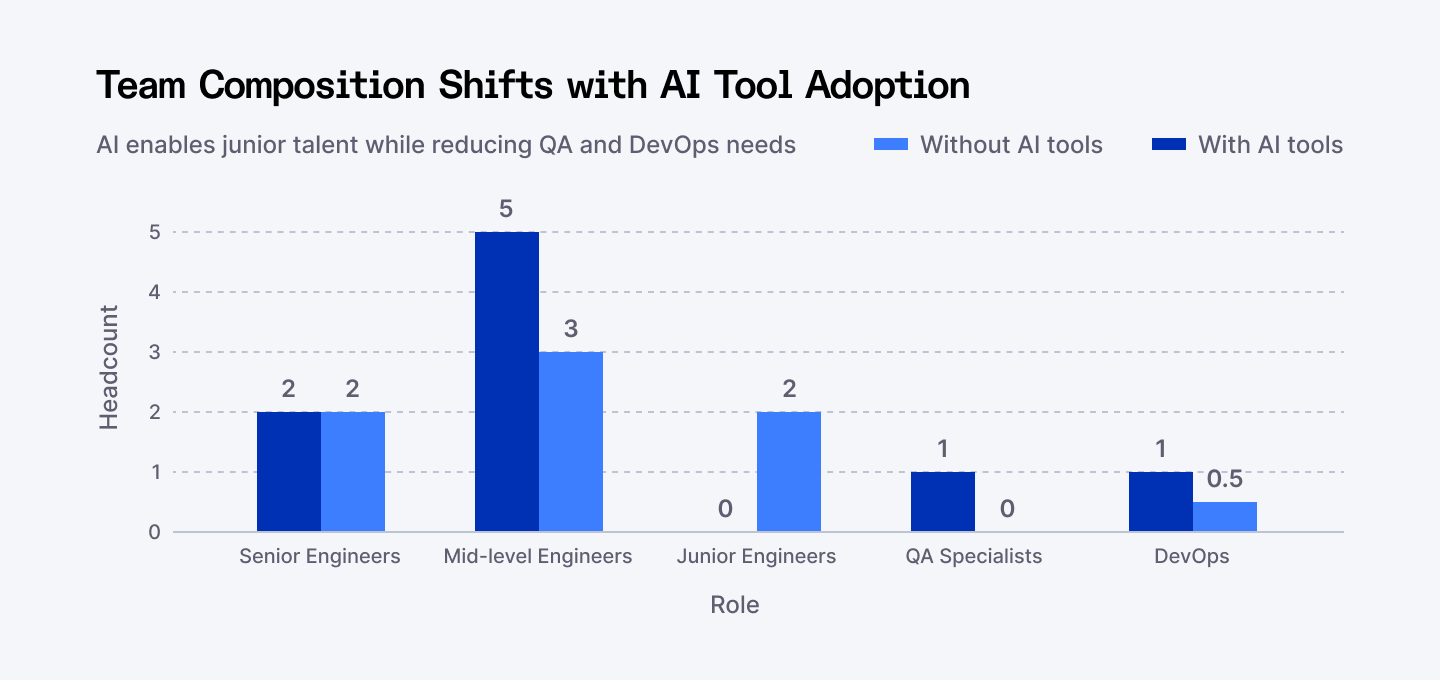
How AI Tools Change Team Composition (Series A SaaS)
Without AI:
You hire 5 mid-level engineers to handle feature work. You add 1 QA specialist. You add 1 DevOps person.
Total cost: $830K/year.
With AI:
You hire 3 mid-level engineers, but add 2 juniors who work effectively with Copilot. Your QA work moves into automated testing. DevOps is now part-time.
Total cost: $678K/year.
Difference: $152K/year. Over three years: $456K. One extra engineer.
The Teams That Save Money
- Use AI for 60-70% of tasks (the automatable stuff)
- Have seniors review AI output (never use it blindly)
- Right-size the team (don't hire for tasks AI handles)
- Measure what actually got faster (don't assume everything improved)
The catch: this only works if you structure it right. Dumping Copilot on your existing team doesn't cut costs. It gives developers expensive toys they second-guess.
Cost Cuts Happen Here (Specific Examples)
Stop thinking of AI as one thing. Think of it as compression across your entire development process.
Code generation
- Before: Senior writes feature (2 weeks) → Junior reviews → Ship
- After: Junior + Copilot (3 days) → Senior reviews → Ship
- Cost per feature: 70% lower.
- Quality: same or better.
Testing
- Before: Hire QA specialist → Manual test planning → Regression fixes
- After: Testim generates tests → Runs continuously → Catches regressions automatically
- Cost shift: QA person becomes testing infrastructure owner. Fewer bugs reach production. Support costs drop.
Documentation
- Before: Technical writer → Writes after code ships → Docs lag reality
- After: Claude / ChatGPT generates from code → Stays in sync → Developers unblocked
- Cost shift: Skip hiring a technical writer for 12-18 months. When you do hire, they focus on examples and tutorials, not API specs.
Infrastructure
- Before: DevOps engineer → Weeks of YAML tuning → Over-provisioned cloud bills
- After: Copilot generates IaC → Amazon Q audits it → Cost optimization baked in
- Cost shift: Infrastructure automation cuts cloud spend 15-25% because you stop over-provisioning out of fear.
Discover the AI tools that make coding documentation faster.
Where AI Costs You Time (Don't Ignore This)
This is critical. If you believe AI makes everything cheaper, you'll waste money.
Complex architectural decisions
"Microservices or monolith?" AI gives okay answers. But it doesn't know your traffic patterns. Your team. Your constraints.
A senior engineer thinks through this in 2 weeks. AI might add 2 weeks of back-and-forth to reach the same answer. Sometimes you end up slower.
Debugging subtle bugs in unfamiliar code
The METR study showed experienced developers took 19% longer with AI when debugging code they didn't write.
Why? AI suggests plausible-sounding fixes that are wrong. You spend time validating they're wrong. Manual debugging wins here.
Security-critical code
Financial transactions. Authentication. Payment processing.
AI code acceptance rates drop to 15-20% here. This means more review work, not less. Human judgment matters too much.
Legacy code refactoring
When you're ripping out code that nobody fully understands, AI gets confused. Context is hidden in system behavior, not documentation. You need a human who can trace through 10 years of shortcuts.
Check out our guide on cutting AI costs if you want specifics on smart API usage and token optimization.
The Real Number Breakdown
Role | Without AI | With AI |
Mid-level engineers (5 / 3) | $400K/year | $240K/year |
Senior engineers | $280K/year | $280K/year |
Junior engineers | $0 | $120K/year |
QA specialist | $90K/year | $0 |
DevOps | $60K/year | $30K/year |
AI tools | $0 | $8K/year |
Total | $830K/year | $678K/year |
Annual savings | — | $152K |
Eight engineers. Series A SaaS. Shipping features every two weeks.
Over three years: $456K saved. One extra engineer's worth of budget, freed up.
How to Implement This (Without Wasting Money)
Don't deploy AI company-wide on day one. That wastes money.
Month 1: Pilot One Tool
GitHub Copilot for most teams. Cost: $10/dev/month.
Start with one team (5-6 people). Measure sprint velocity. See if it goes up.
Budget: $600/year for pilot.
Month 2-3: Measure What Works
Which tasks got faster? Code generation (yes). Debugging (maybe). Architecture (no).
Don't assume everything has improved. Measure time per activity. Adjust workflow around what actually works.
This is the hard part.
Month 4+: Expand With Purpose
Add code review tooling (Greptile, $2-5K/team/month).
Add test automation (Testim, $3-10K/month).
Add Claude for hard problems ($5K/month in API spend).
Track These Metrics:
- Time per feature (should drop 30-40%)
- Code review turnaround (should drop 50%+)
- Bugs in production (should drop 20%+)
- Developer satisfaction (should increase)
If metrics don't move, something's wrong with adoption or workflow, not the tools.
What 2026 Requires
Developers using AI daily ship faster. That's settled.
But hiring changed. Code review got harder. Your seniors now validate AI-generated code instead of writing it. That's a different skill—one that matters more now.
Junior developers who only write boilerplate are worth less. Developers who think critically about AI code and drive architecture are worth more.
That's why Index.dev vets for developers who work with AI tools. Not because it's trendy. Because by 2026, it's table stakes.
Up next: See which AI tools can slash your cloud infrastructure costs.
The Real Takeaway
Stop thinking of AI as a feature you bolt on. Think of it as a restructuring of how you build.
You have a choice:
Do it right: Restructure your team. Use AI for 60-70% of tasks. Have seniors validate. Right-size hiring. Measure ruthlessly. Result: 30-50% cost savings. Ship twice as fast. Same quality.
Do it wrong: Add Copilot to your existing team. Assume everything gets faster. Don't change hiring or workflow. Result: blown budget on tools, frustrated team, nothing changes.
The difference is a single conversation: where does AI actually help, and where do we protect human time?
The SaaS companies winning in 2026 aren't the ones with the biggest budgets. They're the ones who stopped wasting money on human-powered boilerplate.
➡︎ Cutting costs with AI? Hire AI-savvy developers who know how to integrate tools like Copilot and Claude to cut SaaS dev costs and accelerate delivery.
➡︎ Want to take your AI and software cost optimization skills even further? Explore practical strategies and real-world insights from our expert guides: learn 5 smart ways to reduce development costs, discover the top 5 AI tools for cloud infrastructure cost optimization, and uncover 5 cost optimization strategies for fintech infrastructure. Dive into detailed advice on AI application development cost estimation and optimization, explore code optimization strategies for faster software, and avoid common pitfalls with 10 vendor selection mistakes to avoid when choosing your AI recruiting partner. Browse these resources to sharpen your approach, save money, and make smarter AI and software investments.