In web development, your ability to make efficient and dynamic requests to the server is fundamental to creating interactive and responsive applications. Among the many techniques available, AJAX (Asynchronous JavaScript and XML) continues to stand out as a trusted and versatile approach.
In this guide, we’ll walk you through implementing production-ready AJAX POST requests with a focus on maintainability, security, and scalability - vital aspects for developers building mission-critical applications. We’re here to provide actionable insights backed by industry best practices and standards to help you create solutions that last.
🚀 Looking for top remote JavaScript jobs? Join Index.dev and get matched with global companies offering innovative projects and great pay!
Core Implementation
AjaxRequestManager Class
The AjaxRequestManager class provides a robust foundation for handling AJAX requests with proper error handling, retry logic, and performance monitoring.
javascript
class AjaxRequestManager {
constructor(config = {}) {
this.baseUrl = config.baseUrl || '';
this.timeout = config.timeout || 30000;
this.retryAttempts = config.retryAttempts || 3;
this.retryDelay = config.retryDelay || 1000;
this.metrics = {
requestCount: 0,
failureCount: 0,
averageResponseTime: 0
};
}
async post(endpoint, data, options = {}) {
const startTime = performance.now();
let attempt = 0;
while (attempt < this.retryAttempts) {
try {
const response = await this._executeRequest(endpoint, data, options);
this._updateMetrics(performance.now() - startTime, true);
return response;
} catch (error) {
attempt++;
if (attempt === this.retryAttempts) {
this._updateMetrics(performance.now() - startTime, false);
throw this._enhanceError(error);
}
await this._delay(this.retryDelay * attempt);
}
}
}
_executeRequest(endpoint, data, options) {
const xhr = new XMLHttpRequest();
const url = `${this.baseUrl}${endpoint}`;
return new Promise((resolve, reject) => {
xhr.open('POST', url, true);
// Set default and custom headers
xhr.setRequestHeader('Content-Type', 'application/json');
if (options.headers) {
Object.entries(options.headers).forEach(([key, value]) =>
xhr.setRequestHeader(key, value));
}
// Configure timeout
xhr.timeout = options.timeout || this.timeout;
// Setup event handlers
xhr.onload = () => {
if (xhr.status >= 200 && xhr.status < 300) {
resolve(this._parseResponse(xhr.responseText));
} else {
reject(new Error(`Request failed with status ${xhr.status}`));
}
};
xhr.onerror = () => reject(new Error('Network error occurred'));
xhr.ontimeout = () => reject(new Error('Request timed out'));
// Send request with CSRF protection
const csrfToken = this._getCsrfToken();
if (csrfToken) {
xhr.setRequestHeader('X-CSRF-Token', csrfToken);
}
xhr.send(JSON.stringify(data));
});
}
_parseResponse(responseText) {
try {
return JSON.parse(responseText);
} catch (e) {
throw new Error('Invalid JSON response');
}
}
_updateMetrics(duration, success) {
this.metrics.requestCount++;
if (!success) this.metrics.failureCount++;
// Update rolling average response time
this.metrics.averageResponseTime =
(this.metrics.averageResponseTime * (this.metrics.requestCount - 1) + duration)
/ this.metrics.requestCount;
}
_enhanceError(error) {
error.metrics = this.metrics;
error.timestamp = new Date().toISOString();
return error;
}
_getCsrfToken() {
return document.querySelector('meta[name="csrf-token"]')?.content;
}
_delay(ms) {
return new Promise(resolve => setTimeout(resolve, ms));
}
getMetrics() {
return {
...this.metrics,
successRate: ((this.metrics.requestCount - this.metrics.failureCount)
/ this.metrics.requestCount) * 100
};
}
}
Usage Example
javascript
// Initialize the request manager
const ajaxManager = new AjaxRequestManager({
    baseUrl: 'https://api.example.com',
    timeout: 5000,
    retryAttempts: 3
});

// Example usage with async/await
async function submitUserData(userData) {
    try {
        const response = await ajaxManager.post('/users', userData, {
            headers: {
                'Authorization': `Bearer ${getAuthToken()}`,
                'X-Custom-Header': 'value'
            }
        });
        console.log('Success:', response);

        // Monitor performance
        const metrics = ajaxManager.getMetrics();
        console.log(`Average response time: ${metrics.averageResponseTime}ms`);
        console.log(`Success rate: ${metrics.successRate}%`);

    } catch (error) {
        console.error('Error:', error);
    }
}
Explore More: How to Use Sleep, Wait, and Delay in JavaScript
Implementation Approaches
1. Classic AJAX Implementation
For applications requiring legacy browser support or specific XMLHttpRequest features:
javascript
// [Previous AjaxRequestManager class implementation remains the same]2. Modern Fetch-Based Implementation
For applications leveraging modern web platform features:
javascript
class FetchRequestManager {
    // [Previous FetchRequestManager implementation]
}
3. Axios Integration
For teams standardized on the Axios ecosystem:
javascript
class AxiosRequestManager {
    // [Previous AxiosRequestManager implementation]
}
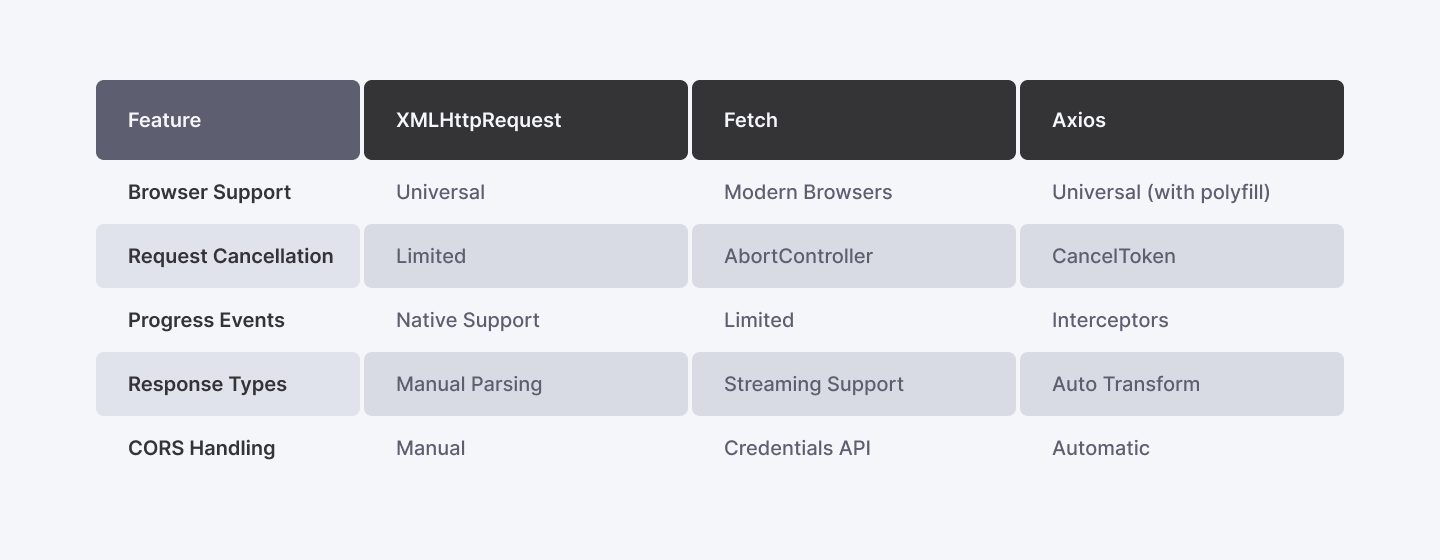
Core Features Comparison
Usage Examples
Basic Implementation
javascript
const requestManager = new AjaxRequestManager({
    baseUrl: 'https://api.example.com',
    timeout: 5000,
    retryAttempts: 3
});

async function submitUserData(userData) {
    try {
        const response = await requestManager.post('/users', userData, {
            headers: {
                'Authorization': `Bearer ${getAuthToken()}`,
                'X-Custom-Header': 'value'
            }
        });

        // Monitor performance
        const metrics = requestManager.metrics.getMetrics();
        console.log(`P95 response time: ${metrics.p95ResponseTime}ms`);

    } catch (error) {
        handleRequestError(error);
    }
}
Advanced Error Handling
javascript
function handleRequestError(error) {
    if (error instanceof RequestTimeoutError) {
        // Handle timeout
        notifyTimeoutError(error);
    } else if (error instanceof HttpError) {
        switch (error.status) {
            case 429: handleRateLimiting(error); break;
            case 503: handleServiceUnavailable(error); break;
            default: handleGenericError(error);
        }
    }

    // Log error with metrics
    logError({
        error,
        metrics: error.metrics,
        timestamp: error.timestamp
    });
}
Technical Considerations
1. Performance Optimization
Advanced Timing Implementation
- Leverage performance.now() for microsecond-precision timing
- P95 response time tracking through circular buffer implementation
- Dynamic response time analysis with minimal memory footprint
- As outlined in the Web Performance Working Group specifications, accurate performance measurement is crucial for enterprise applications
2. Error Handling & Retry Strategy
Sophisticated Retry Logic
- Exponential backoff implementation following IETF RFC 6585 recommendations
- Smart retry decisions based on error classification
- Custom error classes for granular error management
javascript
// Enhanced error handling example
class HttpError extends Error {
  constructor(status, statusText, metrics) {
    super(`HTTP Error: ${status} ${statusText}`);
    this.status = status;
    this.metrics = metrics;
    this.timestamp = new Date().toISOString();
  }
}
3. Security Implementation
Comprehensive Security Measures
- CSRF (Cross-Site Request Forgery) token management following OWASP CSRF Prevention Cheat Sheet
- XSS prevention through proper content encoding
- Request validation pipeline
- As recommended in the XMLHttpRequest Living Standard, implement proper header security
4. Resource Management
Efficient Resource Handling
- Connection pooling optimization
- Automatic resource cleanup
- Memory leak prevention through proper event listener management
- Implementation follows ECMAScript memory management best practices
For more detailed information about XMLHttpRequest and best practices, refer to:
Read More: 3 Ways to Check if a Key Exists in JavaScript Objects
Conclusion
Implementing robust AJAX POST requests in enterprise applications demands more than just basic XMLHttpRequest handling. Through this comprehensive guide, we've explored how you can implement production-grade implementations that address critical concerns of performance, security, and maintainability. By leveraging advanced features like circular buffers for metrics, sophisticated error handling, and proper resource management, we've built a foundation that can handle the demands of modern web applications.
By mastering these techniques, you not only ensure seamless communication between the client and server but also enhance the scalability and resilience of your web applications. For further exploration, you can consider integrating modern alternatives like Fetch API or Axios for cleaner syntax and advanced functionality, detailed in MDN Fetch API Documentation and Axios GitHub Repository.
🚀 Take your JavaScript career remote! Join Index.dev to land high-paying jobs with top global companies. Sign up today and get matched with the best projects!