API integrations serve as the vital connective tissue linking applications, services, and platforms. These integrations power everything from payment processing and data synchronization to third-party feature enhancements and complex microservices architectures. Despite their critical importance, API integrations remain a persistent source of technical challenges that can delay projects, create maintenance headaches, and impact system reliability.
Over the years, we've seen APIs go from optional extras to essential infrastructure. This guide is based on our developers’ encounters tackling API integration challenges across industries. Whether you're a developer or a company considering outsourced talent (like those partnering with us), these insights will help you overcome challenges and optimize your API strategy.
Hire vetted developers through Index.dev’s talent network—access the top 5% of engineers, get matched in 48 hours, and try risk-free for 30 days.
Challenge 1: Handling API Authentication Failures
Authentication failures can derail your entire system at the worst possible moment. We once watched a client's production environment grind to a halt during a major marketing campaign because their authentication tokens expired 90 days after issuance—exactly when their promotion went viral.
When handling API authentication failures, start by examining your credentials and authentication methods. Are you using OAuth, API keys, or JWT tokens? Each has unique quirks that can bite you when you least expect it.
Common Pitfalls
- Expired tokens causing cascading failures across microservices
- Misconfigured permissions that work in development but fail in production
- Network glitches interrupting authentication handshakes—especially with multi-region deployments
- Hard-coded credentials that suddenly stop working after a provider's security update
Key Points
- Security Best Practices: Lock down those credentials! Use proper vaults or secure storage solutions rather than config files or environment variables. Update them regularly and rotate them after team members depart.
- Automated Token Renewal: Implement token refresh mechanisms that trigger at 80% of token lifetime, not 99% to reduce manual intervention.
- Logging and Monitoring: Track authentication patterns, success rates, and error spikes. Set up alerts for unusual activity to identify anomalies early.
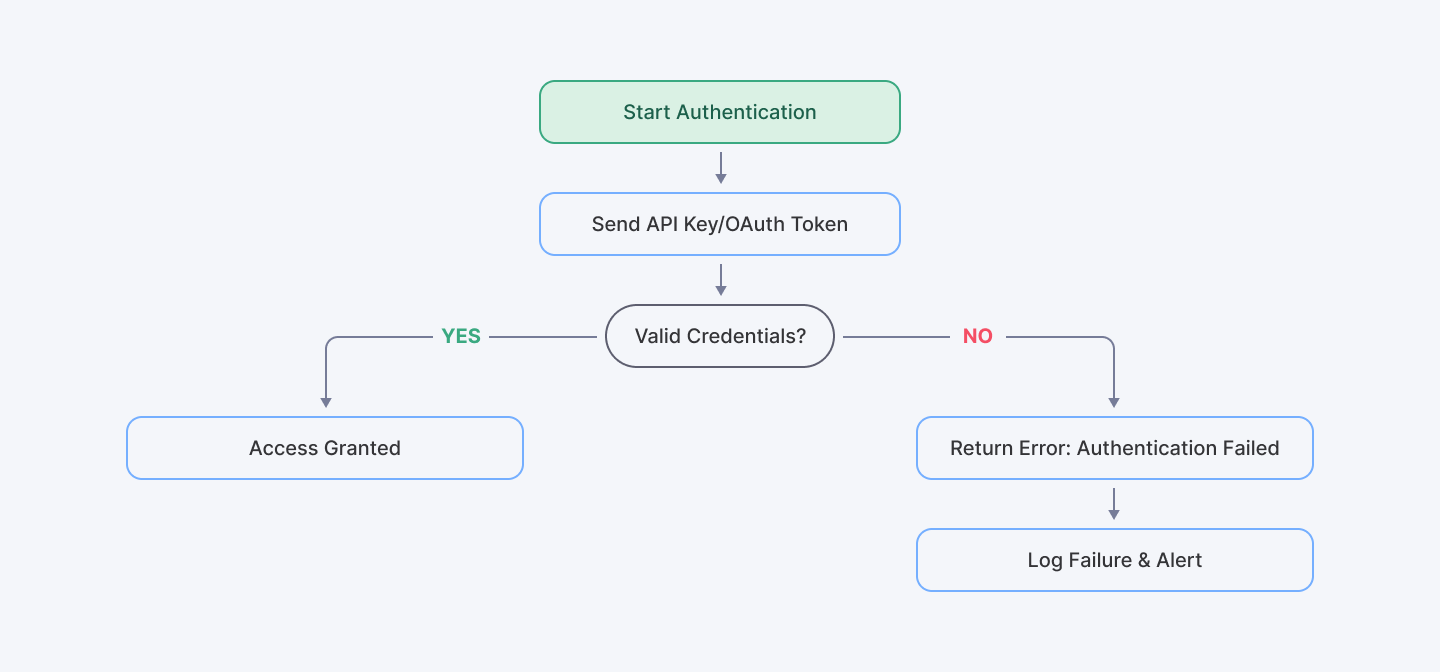
For those looking to dive deeper, the OWASP API Security Project offers excellent guidance—though we'd recommend complementing their theoretical approach with real-world testing in your environment.
Challenge 2: API Request and Response Errors
Few things frustrate developers more than mysterious API request and response errors that work fine in testing but fail in production. These communication breakdowns between your application and the API can stem from seemingly minor issues: incorrectly formatted data, missing headers, or unexpected response formats and HTTP status codes.
Solutions Include
- Data Validation: Trust no one and nothing. Validate incoming and outgoing data structures before they hit your API. JSON Schema validation isn't just for show—it's your first line of defense.
- Error Handling Middleware: Stop writing try/catch blocks everywhere. Implement centralized middleware that catches, logs, and standardizes error handling for easier debugging.
- Robust Testing: Tools like Postman or Swagger can simulate API calls to help you pinpoint issues. They're essential for simulating real-world API behavior. Create test suites that mimic actual user workflows, not just happy paths.
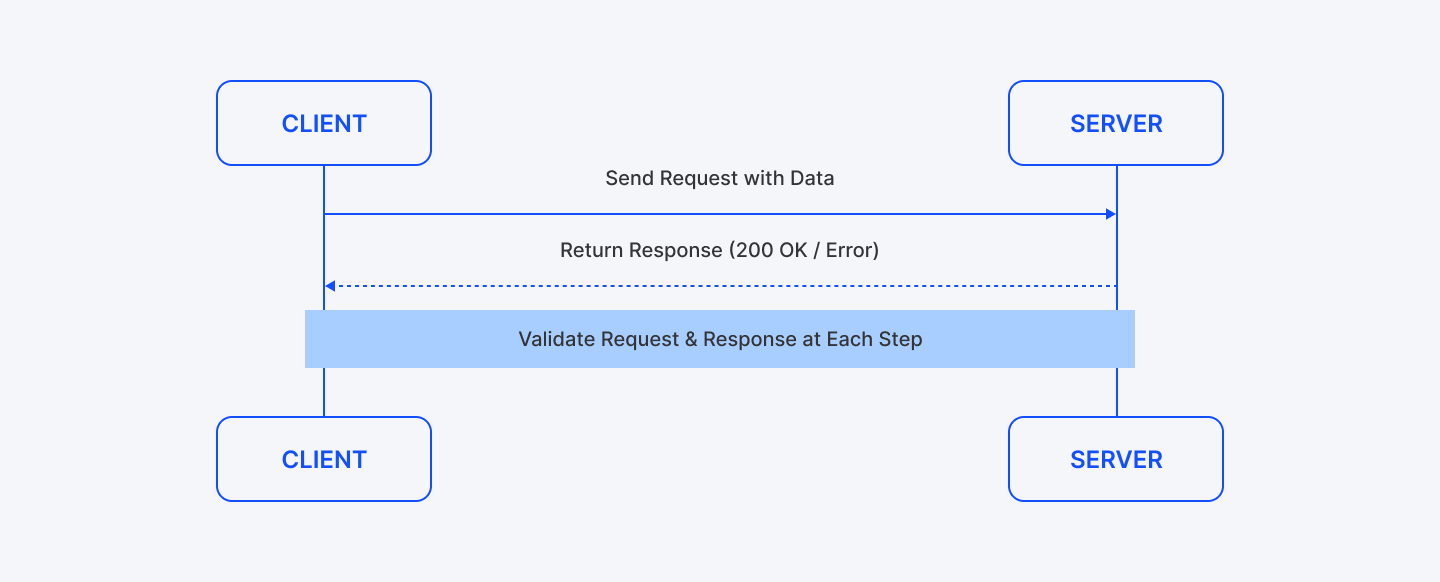
The MDN Web Docs offer solid technical resources on this topic—particularly their sections on HTTP response codes and error handling patterns.
Challenge 3: API Integration and the Complexity of Connecting Systems
Modern applications don't stand alone. They're complex ecosystems of interconnected services, each with its own quirks, limitations, and update schedules. When integrating these systems, three key API integration challenges consistently emerge:
Key Considerations
- Data Consistency: Ensuring information stays synchronized across systems with different data models and validation rules.
- Versioning: Managing multiple API versions while gradually migrating functionality.
- Documentation: Working with external APIs whose documentation is incomplete, outdated, or simply wrong because comprehensive documentation is crucial for mitigating integration risks.
Best Practices
- Use tools like Swagger or Postman to maintain up-to-date documentation that evolves with your API.
- Never skip pre-deployment integration testing (and no, running it locally doesn't count)
- Build circuit breakers and fallback routines for when external APIs inevitably fail.
- Implement API gateways to standardize access patterns and add security controls.
The IBM API Connect Documentation offers additional insights on managing complex integrations—especially for enterprises juggling hundreds of interconnected services. Many modern digital transformation solutions rely heavily on API integration to bridge legacy systems with cloud-native applications and support evolving business requirements.
Also Check Out: Building Scalable API Integrations in ReactJS | How-to Guide
Challenge 4: Common API Errors and Solutions
Every API integration eventually encounters problems—it's not a matter of if, but when. Recognizing and addressing these common API errors and solutions separates teams that struggle from those that thrive.
Frequently Encountered Errors
- 400 Bad Request: Usually caused by malformed parameters, incorrect data types, or missing required fields. We found these often spike after frontend updates that change data structures.
- 401 Unauthorized: Typically indicates issues with handling API authentication failures. These usually cluster around token expiration times or after security policy updates.
- 404 Not Found: Beyond simple typos in endpoint URLs, these frequently indicate version mismatches or deprecated endpoints still being called by legacy code.
- 500 Internal Server Error: Often a result of backend issues or overload. Typically triggered by edge cases your integration partner never tested.
How to Solve
- Implement Detailed Logging: Record everything during errors—request payloads, headers, timestamps, and response details. Context is king when debugging.
- User-Friendly Error Messages: Design error outputs that are clear for both technical and non-technical users and guide users toward solutions rather than just reporting failures. "Your authentication token expired" is far more useful than "Error 401."
- Regular Updates: Stay current with API provider announcements to adjust your integration accordingly. Subscribe to their developer newsletters, join their Discord servers, and follow their GitHub repositories.
Error Code Table
HTTP Status Code | Common Cause | Recommended Solution |
| 400 | Malformed Request | Validate and sanitize inputs |
| 401 | Authentication Failure | Refresh tokens and check credentials |
| 404 | Incorrect Endpoint | Verify API endpoint URL |
| 500 | Server-Side Issue | Retry with exponential backoff |
Challenge 5: Troubleshooting API Integration Issues
When your API integration breaks at 2 AM before a major launch, panic is your worst enemy. What you need is a systematic approach. Troubleshooting API integration issues requires both methodical analysis and technical experience.
We recently worked with a healthcare client whose patient portal kept crashing intermittently—the logs showed 200 OK responses despite users seeing error screens. We spent three days investigating until our team noticed their third-party auth provider was silently timing out.
Steps for Effective Troubleshooting
- Start with the Obvious: Check for expired credentials, recent deployments, or config changes. You'd be surprised how often the culprit is hiding in plain sight.
- Isolate the Problem: Work methodically through the stack—is it the client app? Network hiccup? Or is the API provider having a bad day? We use a checklist approach that saves hours of random troubleshooting.
- Replicate the Error: Use sandbox environments or staging servers to mimic the issue. Don't trust one-off errors. If you can't reproduce it consistently in a staging environment, you'll never confirm it's fixed.
- Consult Documentation: When the API docs say one thing but your errors suggest another, go with what the system is actually telling you. Our team has discovered numerous undocumented API behaviors this way.
Practical Tips
- Monitoring Tools: Tools like New Relic or Datadog aren't just for watching systems fail—they help establish "normal" so you can spot "weird" before it becomes "broken."
- Code Reviews: Rotate troubleshooters every few hours during critical issues. Someone who hasn't been staring at the problem can often spot solutions immediately.
- Collaboration: Don't hesitate to reach out directly to API providers. Build these relationships before you need them—sometimes the quickest resolution comes from a direct message to a contact at the provider.
Microsoft’s API Design Best Practices document has some excellent additional insights, though we've found their guidance works better for REST APIs than GraphQL implementations.
Challenge 6: API Rate Limiting and Throttling Issues
Rate limits are necessary safeguards for APIs, but they can become significant obstacles when they block legitimate requests. Every API team we've worked with has encountered situations where rate limits interfered with normal operations.
API rate limiting and throttling issues typically emerge in three scenarios: during traffic spikes, following code changes that increase call frequency, or when scaling to new user segments.
The e-commerce platform we worked with last Black Friday learned this lesson the expensive way—their inventory API started throttling precisely when holiday shoppers were filling carts. Each 429 error translated directly to abandoned purchases.
Strategies to Mitigate
- Caching: Identify which data truly needs real-time freshness versus what can be cached. We've seen teams reduce API calls by 70% just by caching product details for 10 minutes.
- Bulk Operations: Redesign high-volume operations to use bulk endpoints rather than individual calls. One client reduced their authentication API load by 95% by switching from per-item to batch verification.
- Backoff Algorithms: When you hit limits, don't immediately retry. Implement exponential backoff where each retry waits progressively longer. Couple this with circuit breakers that temporarily disable features rather than continually hammering failing endpoints.
- Load Balancing: Evenly distribute requests to avoid hitting the limit. Allocate API quotas across features based on business priority. Your search functionality might deserve more requests than your low-usage admin panel.
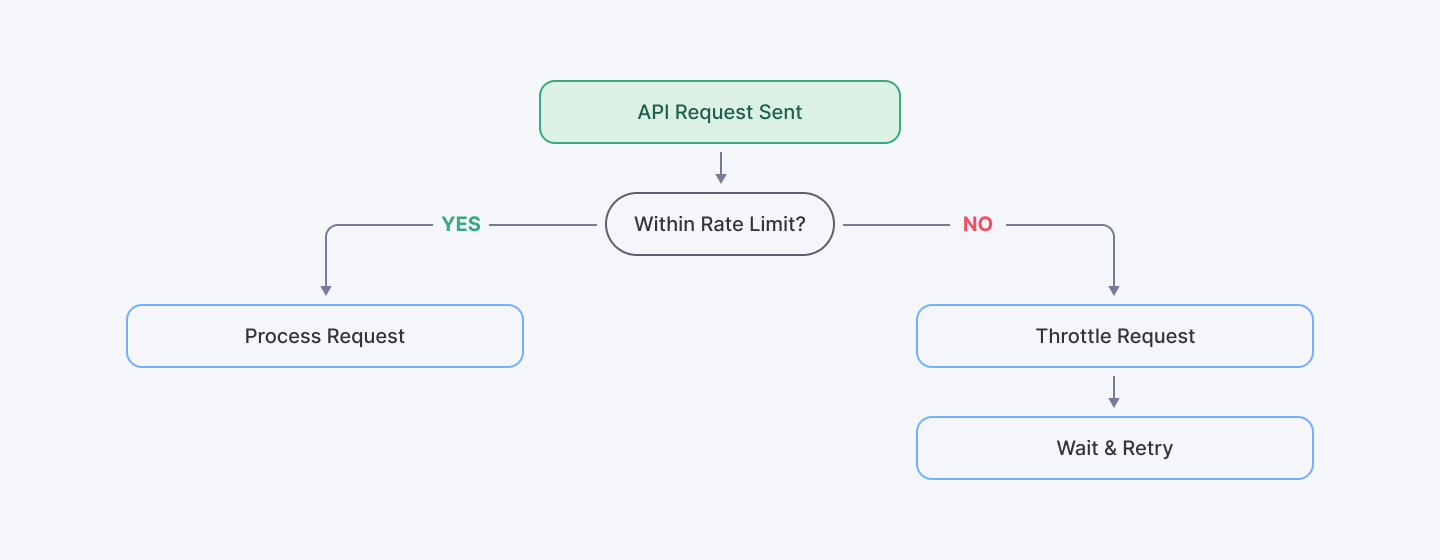
Google Cloud API Rate Limiting Guidelines offers solid theoretical foundations, though their suggested retry intervals are often too aggressive for production workloads.
Challenge 7: Solving API Timeout and Latency Problems
Performance issues can quietly erode user trust before you even realize there's a problem. Solving API timeout and latency problems is often more art than science, requiring both technical optimizations and strategic architectural decisions. Network delays or server slowdowns can significantly impact user experience and requires us to tackle these performance issues head-on.
How to Address Timeout and Latency
- Optimize Your Code: Before blaming the network or third parties, look inward. Ensure that your application code is efficient. We've seen cases where inefficient client-side code added seconds to request processing.
- Use Asynchronous Calls: Wherever possible, employ asynchronous processing to avoid blocking operations that can create cascading delays.
- Implement Retry Logic: Not all retries are created equal. Combine retries with exponential backoff to manage transient issues, but also know when to give up. We typically recommend 3-5 retries with jitter to prevent thundering herd problems during recovery.
- Monitor Performance: Utilize tools like Pingdom or New Relic to track latency and identify bottlenecks. Allocate timeout thresholds based on the operation's criticality.
When dealing with third-party APIs beyond your control, focus on what you can influence—caching strategies, fallback mechanisms, and setting appropriate user expectations. Sometimes the right solution is redesigning the user experience to be more resilient to occasional slowness.
Emphasizing Automation in API Integration
We've learned the hard way that manual processes just don't scale. In 2025, our most successful clients are the ones who've embraced automation and made it central to their API strategy. Automation strategies such as automated testing, CI/CD integration, and continuous documentation updates are essential in overcoming challenges like performance bottlenecks and documentation deficiencies.
Automation Strategies
- Automated Testing: Integrate tools for continuous testing to catch issues early.
- CI/CD Integration: Automate your deployment pipeline to ensure consistent API performance.
- Continuous Documentation: Static API docs lie. Use dynamic tools that update documentation automatically, ensuring that your API guides remain current.
Automation not only speeds up error resolution but also provides reliable frameworks for long-term maintenance.
Also Read: Backend API vs. Frontend API: Understanding the Core Differences
Best Practices for API Error Handling
Nothing reveals your system's true character faster than how it handles errors. We've seen too many teams focus exclusively on the happy path, only to scramble when things inevitably go wrong.
Implementing solid best practices for API error handling requires upfront effort but pays enormous dividends when problems arise since it not only improves reliability but also builds confidence among users and stakeholders.
Guidelines
- Comprehensive Logging: Generic error logs are nearly useless. Make sure your logs capture the full context—user IDs, request parameters, timestamps, correlation IDs across services. Record detailed logs for every API call and error.
- User-Friendly Messaging: Take the time to craft messages that actually help users understand and potentially resolve issues themselves without exposing sensitive data.
- Consistent Error Codes: Standardize error codes across all your APIs—consistent status codes, error types, and message formats to simplify troubleshooting.
- Automated Alerts: Set up notifications to rapidly respond to critical failures. Different error types deserve different response levels. Configure your monitoring to distinguish between "someone should look at this eventually" and "wake the on-call engineer at 3 AM."
- Documentation & Training: Keep internal documentation current and regularly train your team on new error-handling procedures where they analyze recent failures and improve handling.
Integrating these best practices for API error handling not only enhances reliability but also builds trust with your users and stakeholders. Successfully implementing these strategies ensures seamless integration and rapid resolution of issues.
Conclusion
APIs form the backbone of modern software—connecting systems, enabling innovation, and powering the digital experiences we rely on daily. Yet successful integration requires more than just technical knowledge. It demands experience, foresight, and practical problem-solving skills.
Throughout this article, we've explored the real-world challenges teams face: handling API authentication failures that can bring systems down without warning, troubleshooting API request and response errors that mysteriously appear in production, navigating the complexity of connecting disparate systems, addressing common error patterns, developing structured approaches to troubleshooting API integration issues, managing API rate limiting and throttling issues, and solving API timeout and latency problems that frustrate users and damage business outcomes.
What separates successful teams isn't avoiding these challenges. It's how quickly they identify, address, and learn from them. The organizations that thrive don't have perfect integrations; they have resilient systems and processes.
Some practical next steps you might consider:
- Audit your current API integrations for potential weak points
- Develop standardized playbooks for common integration scenarios
- Consider where specialized expertise might accelerate your progress
- Implement monitoring that alerts you to issues before users notice
For developers and business leaders alike, understanding these challenges and implementing effective solutions is crucial for success in 2025. When companies (like those working with Index.dev) invest in these best practices, they’re not only ensuring smoother integrations but also setting the stage for long-term growth and innovation.
The landscape continues to evolve rapidly. New API standards emerge, security requirements grow more complex, and performance expectations rise. But the core principles of successful integration remain surprisingly consistent: build for resilience, communicate clearly across teams, and remember that even the most complex technical solutions ultimately serve human needs.
For Clients: Hire top API developers in 48 hours. Start your free trial with Index.dev.
For Developers: Solve API challenges globally. Join Index.dev and build your remote career.