In 2026, AI tools have become co-workers for developers, not just assistants.
From writing and debugging code to automating documentation, they now shape how developers think, build, and deliver software.
Reports show that 84% of developers use or plan to use AI tools, and 41% of all code is already AI-generated.
This report compiles key statistics from verified online sources and our own research to show how tools like GitHub Copilot and ChatGPT are changing developer productivity, code quality, and work satisfaction.
Note: All reference sources are listed at the end of this article.
Join Index.dev to work remotely on groundbreaking AI projects.
Key Findings: Developer Productivity Statistics
- ~92% of developers use AI tools in some part of their workflow in 2026, mainly for coding, debugging, and automation
- Around 84% use or plan to use AI tools, showing continued strong adoption
- 51% of professional developers use AI tools every day, with daily usage staying stable
- AI generates a large share of code, with surveys showing about 41% of code is AI-generated in real workflows
- Developers report productivity gains of roughly 25–39% when using AI tools
- Controlled studies show task time does not always drop, and experienced developers can be slower once review time is included
- Trust in AI outputs is low in 2026, with only about 29–46% of developers trusting the results
- Many developers manually review AI-generated code due to accuracy concerns
- AI improves readability and structure and reduces some routine errors, but reliability issues remain
- Around 46–68% of developers report quality issues or incorrect outputs from AI tools
- GitHub Copilot users often report faster task completion, though real speed gains vary based on review practices
AI Adoption and Developer Productivity Growth
84% of Developers Use or Plan to Use AI Tools
More developers now depend on AI tools to do their work faster. In 2025, 84% of developers say they use or plan to use AI in their development process. This number has grown from 76% last year. The rise shows that most developers believe AI helps them save time and improve results.
51% of Professional Developers Use AI Tools Daily
AI is not just an extra tool anymore. About 51% of professional developers use AI tools every day. They rely on these tools to complete tasks like writing code, testing, and finding errors. Daily use also shows that AI has become a key part of how modern developers work.
41% of All Code Is Now AI-Generated

A large part of today’s code comes from AI suggestions. Reports show that 41% of all code written in 2025 is AI-generated. This means almost half of a project’s work may involve AI support. Developers still review and improve this code, but AI now handles many basic and repeat tasks, letting teams focus on harder problems.
Read next: Replit usage statistics—growth, users, and AI impact.
Measured Productivity Gains from AI Tools
AI Boosts Developer Productivity by 10–30%
Studies show that AI tools help developers become faster and more efficient. On average, developers report a 10–30% increase in productivity when they use AI for coding tasks. The boost comes from fewer repetitive steps, faster testing, and better error detection. Teams can now build and review projects more quickly.
Developers Save 30–60% Time on Coding and Testing Tasks
AI helps reduce the time spent on regular work like writing test cases, fixing bugs, and creating documentation. Reports show that developers save 30–60% of their time using AI tools. This extra time lets them focus on new ideas, improving user experience, or learning advanced skills.
Outside of coding itself, many teams also rely on tools like a social media scheduler to automate content publishing and reduce manual marketing work, further protecting developer focus and productivity.
GitHub Copilot Users Report 81% Productivity Gains
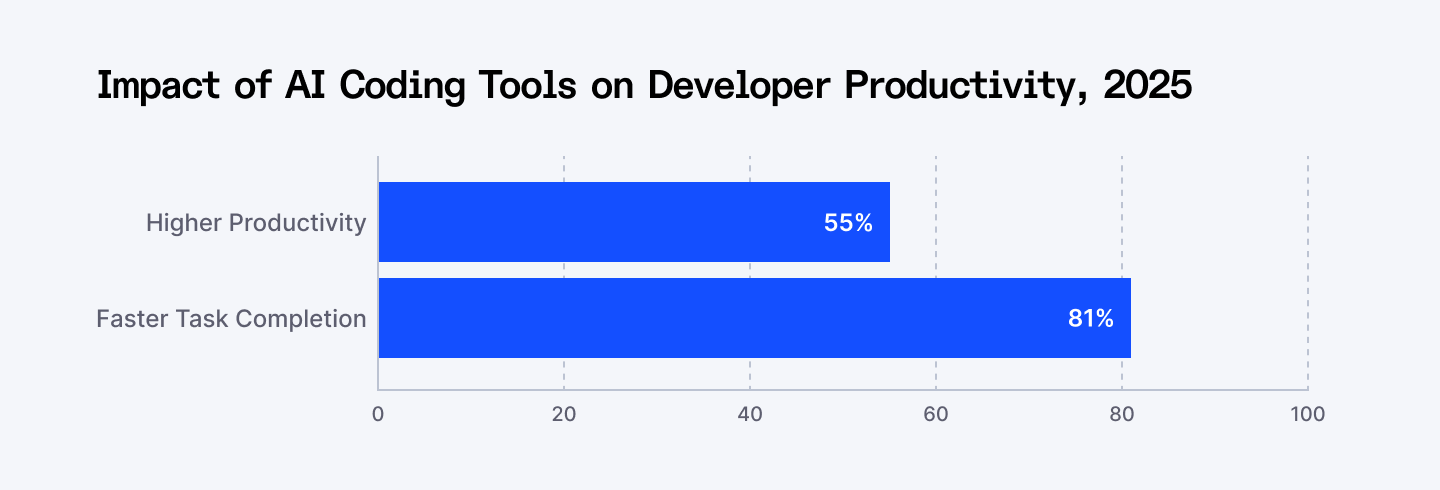
GitHub Copilot is one of the most popular AI coding tools. Around 81% of its users say it helps them complete tasks faster, with 55% higher productivity. Many developers also use Copilot at least five days a week. It assists with writing and testing code, which reduces workload and makes daily development smoother.
Developer Trust and Perception Toward AI Tools
Positive Sentiment Toward AI Tools Dropped to 60% in 2025
In 2025, fewer developers feel fully positive about using AI tools. The overall sentiment dropped to 60%, down from over 70% in 2023 and 2024. Many still believe AI helps with productivity, but some are unsure about its accuracy and long-term effects. The drop shows that while AI is useful, trust remains a concern.
46% of Developers Distrust the Accuracy of AI Outputs
Almost half of all developers, around 46%, say they do not fully trust AI results. Only 33% say they trust them, and a small 3% “highly trust” AI-generated outputs. Developers often find that AI suggestions are close to correct but need review and testing. This checking process slows down work and reduces the full productivity benefit.
75% Developers Still Turn to Humans for Help
Even with AI tools, developers still depend on people for tough coding questions. About 75% say they ask a human for help when they do not trust an AI’s answer. This shows that human expertise remains very important. Developers use AI for support, but final decisions still rely on human judgment.
How Developers Use AI to Boost Productivity
Developers use AI tools for many tasks that make their work faster and easier. Most use them for searching answers, generating test data, learning new skills, and writing documentation. Others use AI for debugging, testing, and code review. Only a few trust AI for high-risk jobs like deployment and monitoring.
The table below shows how developers use AI tools in different parts of their workflow.
AI Use Case | % of Developers Using AI | How It Helps Productivity |
| Search for answers | 54.1% | Saves time by giving quick and direct coding help. |
| Generate content or synthetic data | 35.8% | Creates sample data or text for testing faster. |
| Learn new concepts or technologies | 33.1% | Acts like a quick tutor to explain new skills or tools. |
| Document code | 30.8% | Writes short, clear notes about how code works. |
| Maintain documentation | 24.8% | Updates old project files quickly to keep them correct. |
| Learn about a codebase | 20.8% | Helps new developers understand large or old projects. |
| Debug or fix code | 20.7% | Finds and explains code errors, saving time in fixing. |
| Test code | 17.9% | Checks for bugs and suggests fixes faster than manual testing. |
| Write code | 16.9% | Suggests ready-to-use lines of code and speeds up writing. |
| Predictive analytics | 11.0% | Finds trends or patterns to plan better development steps. |
| Project planning | 10.8% | Helps estimate tasks and resources for upcoming projects. |
| Commit and review code | 10.2% | Speeds up peer review by suggesting better code. |
| Deployment and monitoring | 6.2% | Used less due to risk and the need for full accuracy. |
Productivity Challenges and Limitations
66% Face “Almost Right but Not Quite” AI Solutions
About 66% of developers say the biggest issue with AI tools is that they give results that are not fully correct. These answers may look correct, but often fail during testing. Developers then spend more time checking and editing, which cancels out the time they expected to save with AI.
Debugging AI Code Takes 45% More Time
Nearly 45.2 % of developers say debugging AI-generated code takes longer than fixing human-written code. This happens because AI tools may not understand the full context of a project. Developers must read and test every suggestion carefully to make sure it works. As a result, total task time increases even though AI speeds up early steps.
Developers Avoid AI for Critical Tasks 69–76%
Around 76% do not use AI for deployment and 69% skip it for planning. These tasks need accuracy and clear decision-making, and developers feel more comfortable handling them themselves. This shows that AI is trusted more for support work than for final control.
Code Quality Increased by 3.4% with AI Tools
Studies show that code quality improved by 3.4% when developers used AI tools. Features like auto-suggestions, code completion, and error detection help catch mistakes early. This makes the final code more stable and easier to maintain, reducing the number of bugs in later stages.
More Bugs and Slowdowns in Some Cases
Studies show that projects using too much AI-generated code experienced a 41% rise in bugs. Teams also faced small drops in delivery speed (1.5%) and system stability (7.2%). While AI speeds up certain coding steps, skipping manual reviews can reduce reliability. Proper testing and human checks are still essential to keep quality and performance high.
Cognitive and Quality-Based Productivity Improvements
Flow and Focus Improved by 2.6%
AI tools help developers stay in a steady work rhythm called “flow.” Reports show a 2.6% improvement in flow because AI reduces small interruptions like searching for syntax or fixing tiny errors. This steady focus helps developers complete tasks faster and with fewer mistakes.
Job Satisfaction and Well-Being Improved
Developers also report feeling happier and less stressed when using AI. Studies found a 2.2% rise in job satisfaction because AI handles repetitive work. It gives developers more time to focus on interesting tasks. Burnout risk dropped by 17% for AI users, showing that smarter workflows can improve both performance and morale.
Documentation and Review Speed Improved
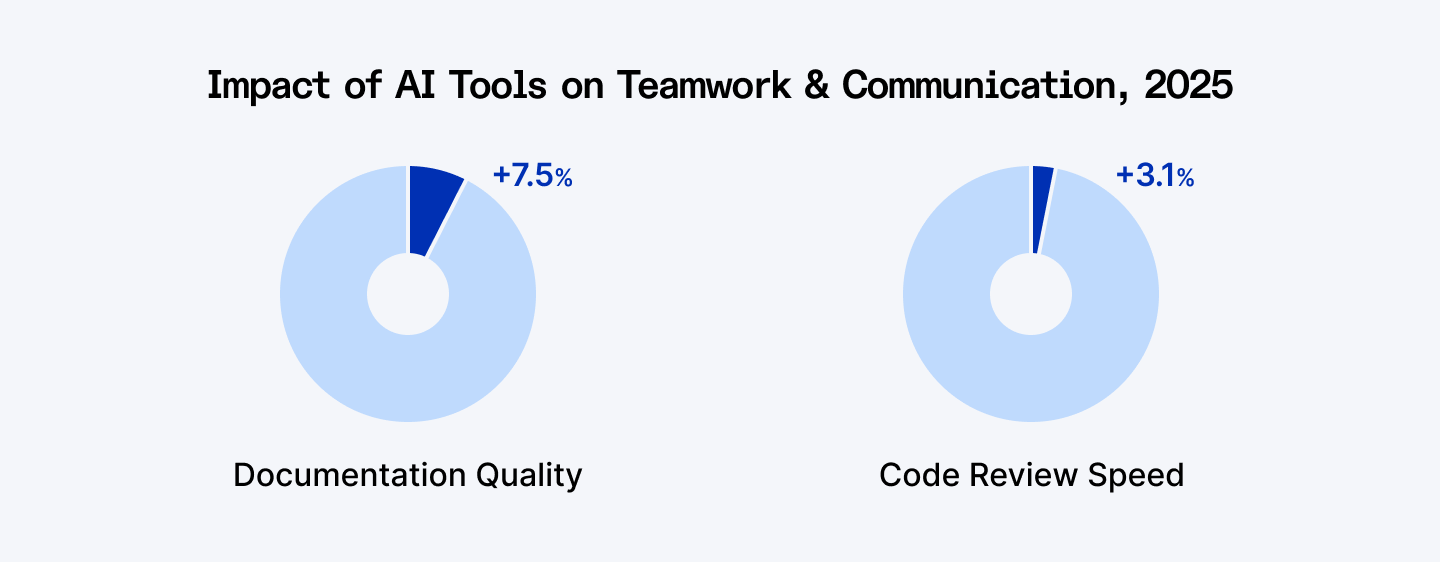
AI tools also help in teamwork and communication. Documentation quality improved by 7.5%, while code review speed increased by 3.1%. These improvements help teams work together more smoothly and deliver projects on time with better accuracy.
Perceived vs Actual Productivity with AI Tools
Developers Expected AI to Make Them 24% Faster
Before using AI tools, developers expected them to save a lot of time. Surveys show they believed AI would make them about 24% faster. Many thought AI could handle most of the simple work, so they could focus on logic, structure, and design.
In Reality, with AI Tools Developer Tasks Took 19% Longer
When tested, the same developers actually took 19% longer to finish their tasks with AI. The extra time came from checking, debugging, and fixing AI-generated code. Even though AI gave quick suggestions, the review process made the total work time longer than expected.
Developers Still Believe AI Made Them 20% Faster
Interestingly, developers still believed they worked 20% faster with AI, even though they were slower in real tests. This shows that AI affects how people feel about their productivity. The tools give them confidence and reduce mental pressure, which creates a sense of progress even when real gains are small.
Next up: 40+ important ChatGPT statistics developers should know.
Final Words
AI tools are changing how developers work in 2025. They help with writing code, testing, debugging, and documentation. Many developers now use AI every day to save time and reduce effort. Studies show real gains in focus, accuracy, and job satisfaction.
Still, AI is not perfect. Many developers say its results are often almost right but not fully correct. This means they must spend extra time checking and fixing errors. Trust and reliability are still major challenges, especially for complex or high-risk tasks.
Overall, AI tools make developers more productive when used wisely. The best results come when humans and AI work together. AI handles routine tasks, and developers use their skills to make sure the code is correct and of high quality. The future of coding will depend on how well developers balance speed, accuracy, and trust in AI.
Build your career where AI and innovation meet. Join Index.dev’s global talent network and turn your coding skills into real impact. Work on cutting-edge AI projects, get matched with top companies, and grow your remote career with high-paying opportunities
FAQs
1. How many developers use AI coding tools in 2025?
In 2025, about 84% of developers use or plan to use AI tools in their workflow. Nearly 51% use them daily for coding, testing, and debugging tasks, showing that AI has become a normal and essential part of modern software development.
2. How much of today’s code is written by AI?
Around 41% of all code written in 2025 is AI-generated. Developers still review and refine this output, but AI now handles repetitive and routine coding work, allowing teams to focus on design, problem-solving, and system architecture.
3. How much productivity gain do developers get from AI tools?
AI tools boost developer productivity by 10–30% on average. Developers save up to 60% of their time on coding, testing, and documentation tasks. Tools like GitHub Copilot also show up to 81% productivity improvement among active users.
4. Why do developers still not fully trust AI-generated code?
About 46% of developers say they don’t fully trust AI outputs. Many AI suggestions are “almost right but not fully correct,” which requires manual checking. This extra debugging time often cancels out the expected speed and efficiency gains.
5. What are the main challenges developers face with AI coding tools?
The biggest challenges include inaccurate code suggestions (66%), longer debugging times (45%), and poor suitability for critical tasks like deployment and project planning. Overuse of AI-generated code also increases bug rates and reduces overall system stability.
6. Do AI tools improve developer focus and job satisfaction?
Yes. Studies show a 2.6% improvement in developer focus and a 2.2% rise in job satisfaction with AI tools. Burnout risk also dropped by 17%, as AI helps reduce repetitive work and allows developers to focus on creative problem-solving.
7. Do developers feel more productive with AI even if results differ?
Yes. Even though tests show developers took 19% longer with AI tools, most still believe they worked 20% faster. This feeling comes from reduced mental load and faster idea generation, even if real task time increased slightly.