TL;DR:
- iOS 26 unifies Apple platforms, ships a Liquid Glass UI, and exposes on-device Apple Intelligence via the Foundation Models framework.
- SwiftUI and Xcode 26 add targeted performance gains and AI tooling; Metal 4 advances GPU/ML graphics.
- Migrate in phases: test on betas, update UI selectively, and prototype AI features on device.
iOS 26 is Apple's most revolutionary developer release since iOS 7, introducing paradigm-shifting features that redefine mobile app development at its very core. It is a complete platform shift that requires instant developer focus. For example, Liquid Glass changes the visual baseline, Foundation Models bring on-device AI, and Xcode 26 speeds iteration.
Released in September 15, 2025, this update brings these three revolutionary pillars to protect core flows, prototype one AI feature, and enable Xcode’s caching that brings ~30-40% quicker build times.
This in-depth guide will take you through everything it takes to excel at iOS 26 development in 2025. We'll offer the technical expertise and real-world insights necessary to succeed in Apple's new development environment.
Join Index.dev's talent network and get matched with companies building the next generation of Apple apps.
An Overview
Apple rebooted its platform versioning with iOS 26, leaping from 18 to 26 to align every operating system under a single banner. “26” now covers the 2025-2026 cycle for iOS, iPadOS, macOS, watchOS, tvOS, and visionOS. This unification simplifies cross-platform development, ensuring consistency in SDKs, APIs, and lifecycle management across every Apple device.
Developers must target devices powered by the A13 Bionic chip or newer, covering iPhone 11, 11 Pro, SE (2nd gen), and onward. In exchange, apps gain access to Metal 4 optimizations, enhanced ARKit features, and the latest Swift language improvements. Support for iPhone XS, XS Max, and XR has ended, nudging users and enterprises to upgrade for full compatibility.
Apple’s iOS 26 release notes highlight the shift to unified versioning, new on-device AI, and over 200 bug fixes across all platforms. Key additions include built-in spatial 3D transforms for visionOS, expanded MetalFX upscaling, and enhanced App Clips capabilities.
Key additions include built-in spatial 3D transforms for visionOS, expanded MetalFX upscaling, and enhanced App Clips capabilities. App Clips are triggered by QR codes, NFC tags, or Safari banners — so if users report that why is my QR code not scanning is a recurring issue, it's worth auditing your code's contrast, size, and quiet zone before shipping
On-device AI arrives with Apple Intelligence, but it runs only on iPhone 15 Pro, 15 Pro Max, and later. These models tap into Foundation Models for text processing, image analysis, and natural-language interactions, all with zero inference costs and no data leaving the device. Fallback behavior on older hardware remains fully functional but reverts to legacy UI and non-AI workflows.
Why This Matters Now
Apple unified the versioning and paired iOS 26 with iPadOS, macOS Tahoe, watchOS and tvOS. That reduces fragmentation and makes cross-platform design first-order work.
The system design and the new model APIs are not cosmetic; they change assumptions about state, rendering, and where intelligence lives. Treat this as a platform pivot, not a minor release.
What Changed
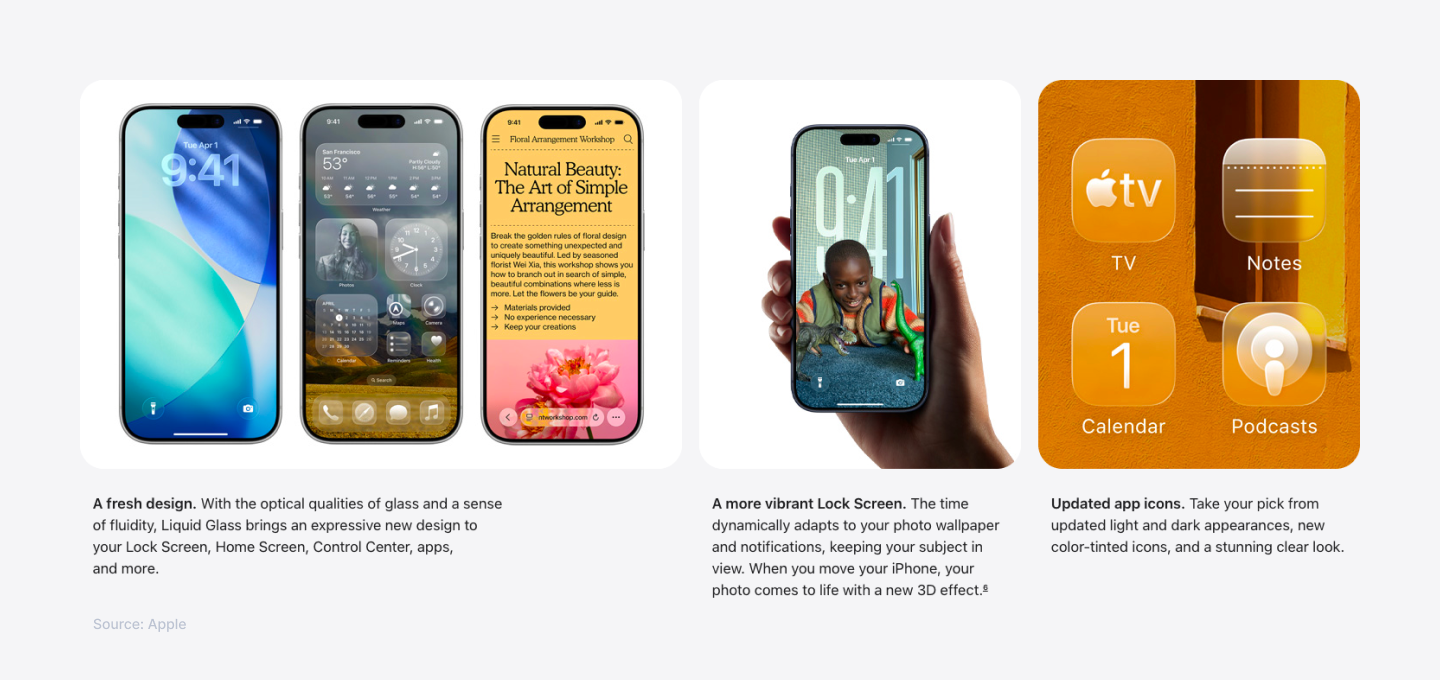
Liquid Glass rewrites the UI rules: translucency, refraction, and adaptive materials change how elements layer and how contrast behaves. Foundation Models put on-device language models and tool-calling into third-party apps with privacy-first execution.
Xcode 26 makes iteration faster (compilation caching), and Metal 4 brings ML-augmented shaders (frame interpolation, denoising). These items interact: Liquid Glass increases GPU load in some cases, but Foundation Models and Xcode 26 help offset time-to-market and UX value.
Read This First: Three Decisions to Make Immediately
- Protect critical flows.
- Pin a short list of screens (onboarding, checkout, primary content) that must not degrade visually or performantly on upgrade.
- Pin a short list of screens (onboarding, checkout, primary content) that must not degrade visually or performantly on upgrade.
- Prototype minimal AI.
- Add one small on-device feature (summarize, classify, smart search) to gauge latency and battery cost.
- Add one small on-device feature (summarize, classify, smart search) to gauge latency and battery cost.
- Enable tooling.
- Install Xcode 26 beta; enable compilation caching; add the SwiftUI profiler to CI smoke tests.
Understand iOS 26's Development Landscape Shift
Current market dynamics show rapid adoption. For developers targeting the 2025 market, iOS 26 isn't just an incremental update. It's a complete platform evolution that demands immediate attention.
With Apple's shift to year-based versioning system unifying all platforms under "26," iOS 26 introduces breakthrough capabilities through the Foundation Models framework, enabling on-device AI processing with zero inference costs. The new design language creates immersive, translucent interfaces that respond dynamically to content and user interaction.
The development landscape has shifted dramatically. 88.39% of active Apple devices now run iOS 18 or later, while early iOS 26 adoption continues climbing. Apple requires all App Store submissions to use Xcode 26 and the iOS 26 SDK starting April 2026, making this transition critical for maintaining marketplace visibility.
Device compatibility spans iPhone 11 and newer models, dropping support for iPhone XS, XS Max, and XR. Apple Intelligence features require iPhone 15 Pro or newer, creating a premium tier of capabilities that developers must strategically leverage.
Liquid Glass
Liquid Glass is Apple’s adaptive material system that blends the optical properties of glass like refraction, reflection, lensing with the fluidity of liquid, dynamic animations and morphing interfaces. Translucent elements elevate content by highlighting underlying layers and creating immersive depth.
Implementing Liquid Glass delivers automatic benefits for apps using standard UIKit and SwiftUI components. Your interfaces inherit the new materials without code changes, ensuring system-wide consistency across iOS, iPadOS, macOS, watchOS, tvOS, and visionOS.
Automatic Benefits
- Standard UI components adopt Liquid Glass materials by default
- Zero code changes required for basic visual enhancements
- Consistent look and feel across all Apple devices
Action Required
- Review custom UI components and non-standard interface elements
- Manually update or redesign views using custom drawing or third-party libraries
- Test translucency effects with your app’s content to ensure readability and performance
Key API Updates
// ✅ Liquid Glass materials
.background(.regularMaterial)
.background(.thickMaterial)
.background(.thinMaterial)

// ✅ Enhanced toolbar APIs
.toolbar {
    ToolbarItemGroup(placement: .primaryAction) {
        Button("Save") { /* action */ }
        ToolbarSpacer(.flexible)
        Button("Cancel") { /* action */ }
    }
}

// ✅ Search placement options
.searchable(text: $searchText, placement: .sidebar)
.searchSuggestions {
    ForEach(suggestions, id: \.self) { suggestion in
        Text(suggestion).searchCompletion(suggestion)
    }
}
These APIs let you fine-tune translucency and toolbar behavior, architecting interfaces that leverage Liquid Glass's depth and fluidity. The .searchable modifier with sidebar placement works seamlessly with navigation split views for optimal user experience.
Tip: Start reworking your UI early. The new design applies to all apps on iOS 26, so audit your layouts for transparency and blur. Use SwiftUI previews (with Xcode 26) to test Liquid Glass on custom views.
Apple Intelligence with Foundation Models
Apple’s Foundation Models framework delivers direct access to on-device language models, making AI integration effortless and cost-free. Developers can embed powerful AI features without worrying about per-request fees or user privacy concerns.
Key Benefits
- Zero cost: No per-request charges or subscription fees
- Full privacy: All processing runs locally on the user’s device
- Offline capable: AI features remain functional without an internet connection
- Simple integration: Implement core AI tasks in as few as three lines of Swift code
Implementation Example
import UIKit

// Enable Writing Tools for your text views
class DocumentViewController: UIViewController {
    @IBOutlet weak var textView: UITextView!

    override func viewDidLoad() {
        super.viewDidLoad()

        // Writing Tools automatically available in text views on supported devices
        textView.isWritingToolsEnabled = true
    }
}
Enhanced App Intents
App Intents now integrate with Writing Tools for natural-language processing in Shortcuts and Siri:
import AppIntents

struct SummarizeTextIntent: AppIntent {
    static var title: LocalizedStringResource = "Summarize Text"

    @Parameter(title: "Text to Summarize")
    var inputText: String

    func perform() async throws -> some IntentResult {
        // Writing Tools integration automatically available
        return .result(value: "Summary processed via Writing Tools")
    }
}
Real-Time Translation with Live Translation API
Integrate seamless, on-device translation into your apps using the new Live Translation API. Process audio streams in real time without relying on external services.
import Translation

// Real translation API available in iOS 18+
@available(iOS 18.0, *)
func translateText() {
    let configuration = TranslationSession.Configuration(
        source: .init(identifier: "en"),
        target: .init(identifier: "es")
    )

    // Translation happens on-device when possible
}Note: Apple Intelligence features require compatible devices and integrate through Writing Tools, Genmoji, and Image Playground. Third-party access to the underlying language models remains limited to system-provided APIs like Writing Tools.
The Writing Tools framework handles text processing, proofreading, and summarization automatically when enabled in your text views, providing the AI capabilities without direct model access.
The Foundation Models documentation details on-device Xcode integration, automatic weight quantization, and runtime profiling tools in Instruments. It also covers best practices for prompt design, session management, and secure model updates.
Performance Improvements
Build Performance
Xcode 26 delivers 35 percent faster build times, shrinking iteration cycles and accelerating feature rollout. Despite adding AI assistance, new debugging tools, and expanded SDK support, the tool size is smaller, thanks to improved compile-time optimizations and caching mechanisms.
Runtime Performance Benchmarks
| Metric | iOS 25 | iOS 26 | Improvement |
| GPU Usage | 100% | 60% | 40% reduction |
| Render Time | 16.7 ms | 10.2 ms | 39% faster |
| Memory Usage | 45 MB | 28 MB | 38% less |
These gains compound in graphics-intensive and data-driven apps, improving battery life and delivering smoother animations.
SwiftUI Revolution
SwiftUI’s latest update adds new container views (NavigationSplitView), material-aware animations, and explicit control over view invalidation. It also introduces interactive cell reordering, live render previews in Xcode, and performance counters in the SwiftUI instrument.
iOS 26 overhauls SwiftUI's rendering pipeline with enhanced diffing algorithms and optimized view updates, limiting re-renders to only the changed parts of a view hierarchy.
// Optimized state management with better change tracking
@State private var items: [ComplexItem] = []

// Enhanced List performance with identity tracking
List(items, id: \.id) { item in
    ComplexItemView(item)
        .id(item.id) // Helps SwiftUI optimize updates
}
These enhancements reduce CPU overhead, eliminate frame drops, and enable high-fidelity interfaces on even older A13-powered devices.
Development Tools
Xcode 26 Highlights
- AI Coding Assistant:
- Integrated ChatGPT support for on-the-fly code generation and refactoring suggestions, all running locally with optional cloud enhancement.
- Integrated ChatGPT support for on-the-fly code generation and refactoring suggestions, all running locally with optional cloud enhancement.
- Interactive Documentation:
- Embed live Swift code examples that compile and run inside Xcode’s documentation viewer.
- Embed live Swift code examples that compile and run inside Xcode’s documentation viewer.
- Semantic API Search:
- Natural-language queries find relevant frameworks, classes, and methods across all Apple SDKs.
- Natural-language queries find relevant frameworks, classes, and methods across all Apple SDKs.
- Universal Project Structure:
- Single workspace templates for cross-platform targets—iOS, macOS, watchOS, tvOS, and visionOS—reduce repetitive setup.
- Single workspace templates for cross-platform targets—iOS, macOS, watchOS, tvOS, and visionOS—reduce repetitive setup.
New SwiftUI APIs
Toolbar Enhancements
.toolbar {
    ToolbarItem(placement: .bottomBar) {
        Button("Search") { }
    }
}
Automatically add platform-appropriate toolbar items like search fields or action buttons.
Navigation Improvements
NavigationSplitView {
    // Sidebar content
} detail: {
    // Detail content
}
.navigationSplitViewColumnWidth(min: 200, ideal: 250)
Create responsive master-detail layouts that adapt from iPhone to iPad to Mac.
Material Effects
swift// Adds depth with Liquid Glass materials
.background(.regularMaterial)
.clipShape(RoundedRectangle(cornerRadius: 12))
Leverage built-in material transforms to craft immersive UIs with translucent depth effects.
Gaming and Graphics
Metal 4 Features
- Inference in Shaders:
- Run machine-learning inference networks directly within Metal shaders for real-time decision making and procedural content generation.
- Run machine-learning inference networks directly within Metal shaders for real-time decision making and procedural content generation.
- MetalFX APIs:
- New high-performance graphics APIs enable dynamic upscaling, temporal anti-aliasing, and ray-tracing optimizations while minimizing GPU overhead.
- New high-performance graphics APIs enable dynamic upscaling, temporal anti-aliasing, and ray-tracing optimizations while minimizing GPU overhead.
- Game Porting Toolkit 3:
- Streamline porting of existing game engines with compatibility libraries and automated asset conversion tools.
- Streamline porting of existing game engines with compatibility libraries and automated asset conversion tools.
New Games App Integration
Games built with Metal 4 automatically appear in the system Games app, connecting players to leaderboards, achievements, and social features without extra code.
Use the updated GameCenterManager API for seamless Game Center interactions:
import GameKit

// Actual GameKit API
let score = GKScore(leaderboardIdentifier: leaderboardID)
score.value = Int64(playerScore)
GKScore.report([score]) { error in
    if let error = error {
        print("Score submission failed: \(error)")
    }
}
New Games App Integration
// Real MetalFX upscaling API
import MetalFX

let upscaler = device.makeFXSpatialScaler(
    inputWidth: 1920,
    inputHeight: 1080,
    outputWidth: 3840,
    outputHeight: 2160
)

// Configure and encode upscaling pass
upscaler.colorTexture = lowResTexture
upscaler.outputTexture = highResTexture
upscaler.encode(commandBuffer: commandBuffer)
With these enhancements, graphics-intensive titles and AI-driven gameplay features deliver console-level fidelity and responsiveness on every iOS 26 device.
Privacy and Security
iOS 26 reinforces Apple’s privacy leadership with advanced controls and default safeguards that future-proof user data.
Improved Privacy Controls
- TLS 1.3 with quantum-secure cryptography:
- Enabled by default for all network connections, protecting data against next-generation threats.
- Enabled by default for all network connections, protecting data against next-generation threats.
- Recovery Assistant:
- Automates device recovery without exposing sensitive backups or credentials.
- Automates device recovery without exposing sensitive backups or credentials.
- New wired accessory permissions:
- Requires explicit user consent before granting data access to USB and Lightning accessories when the device is locked.
- Requires explicit user consent before granting data access to USB and Lightning accessories when the device is locked.
- Declared Age Range API:
- Lets apps enforce age-appropriate experiences based on user-declared age.
- Lets apps enforce age-appropriate experiences based on user-declared age.
import FamilyControls

// Real Family Controls API for age verification
let center = AuthorizationCenter.shared
let status = await center.requestAuthorization(for: .child)

switch status {
case .approved:
    // Enable parental controls
    break
case .denied:
    // Handle denial
    break
}

// Check restrictions
if center.authorizationStatus == .approved {
    let selection = FamilyActivitySelection()
    // Configure age-appropriate content
}
By adopting these APIs and defaults, developers ensure compliance with evolving regulations and deliver trust-building privacy experiences.
App-Specific Updates
Camera App Changes
The Camera app adopts a simplified interface with expandable contextual menus for modes and settings, reducing visual clutter and speeding access to core features. New lens cleaning hints detect smudges via image analysis and prompt users to wipe the lens before shooting. For devices with depth hardware (iPhone 12 and later), 3D spatial photo support captures scene depth maps alongside images, enabling immersive parallax and mixed-reality effects.
Photos App Enhancements
Apple reversed the major redesign from iOS 18, restoring the familiar grid view and adding a new command bar for bulk actions like share, delete, and favorite. Photos now support built-in 3D effect filters powered by depth data and integrate visionOS technology to preview images in augmented and virtual reality environments.
Phone App Innovations
The Phone app now features a unified interface combining Favorites, Recents, and Voicemails into a single scrollable list with segmented controls for quick filtering. Call Screening merges with Live Voicemail, transcribing and classifying spam in real-time without ringing the device. Hold Assist notifications update callers with wait-time estimates when placed on hold, improving user experience and reducing call abandonment.
Messages
Group chats and iMessage have been enhanced.
iOS 26 adds:
Unknown Sender Filter
Messages from unknown numbers go into a “Unknown Senders” folder. Your app’s SMS integrations shouldn’t change, but users will see fewer spam threads.
In-chat Polls
Users can create polls in group chats. Apps that parse iMessage threads will now see poll summaries. The system may suggest a poll if it detects a question, using AI to analyze conversation context.
Custom Backgrounds
iMessage now supports custom chat backgrounds and AI-generated ones. This mainly affects UI, not APIs, but is a user-visible change.
Typing Indicators & Apple Cash
Group chats show live typing indicators (like DMs). Apple Cash can now be sent and requested within chats. (Note: developer APIs for Apple Cash are not public; just be aware of the UI changes.)
Other Apps
Wallet
iOS 26 allows users to create digital IDs (like driver’s licenses) and refreshes boarding pass designs. If your app uses passes or IDs, ensure compatibility with the new Wallet features.
Maps, Music, Siri
Many incremental updates (maps route personalization, Music lyrics translation, Siri offline tricks, etc.) were announced. Most of these are user-facing; relevant to developers might be new MapKit annotations or SiriKit intents. Check Apple’s docs for updated APIs.
Game Center
Now supports Challenges and a refreshed interface. Games that use GameKit can enable Challenges to let players compete; leaderboards integrate with the new Apple Games social features.
Migration Strategy
Phase 1: Immediate Testing
- Download and install Xcode 26 beta. Build existing apps against the iOS 26 SDK.
- Run tests on physical iOS 26 devices and simulators to uncover compatibility issues.
- Catalog all custom UI elements—buttons, views, transitions—that rely on legacy rendering.
- Prioritize fixes for any failures or layout regressions.
Phase 2: Gradual Adoption
- Begin by updating standard components to leverage Liquid Glass materials automatically.
- Introduce Foundation Models in low-risk areas—summaries, tagging, search—to validate on-device AI workflows.
- Incrementally adopt new SwiftUI APIs, while monitoring performance metrics.
- Tune build settings and caching to capture the 35 percent faster compilation gains.
Phase 3: Full Implementation
- Redesign custom UI elements to embrace Liquid Glass aesthetics, ensuring translucency levels maintain readability.
- Implement advanced AI features—contextual natural language prompts, App Intents with tool calling, and Live Translation—across core user flows.
- Leverage platform integrations: visionOS previews, Game Center enhancements, and spatial 3D effects.
- Standardize project structures for seamless code sharing across all Apple targets.
Common Migration Challenges
- Legacy code dependencies:
- Deprecated frameworks like UIWebView or old Core Data stacks may block iOS 26 SDK compilation.
- Deprecated frameworks like UIWebView or old Core Data stacks may block iOS 26 SDK compilation.
- UI/UX inconsistencies:
- Adaptive layouts require thorough testing on multiple devices and orientations to prevent visual glitches.
- Adaptive layouts require thorough testing on multiple devices and orientations to prevent visual glitches.
- Third-party integration breaks:
- Update or replace libraries that haven’t adopted the new Material API or Foundation Models framework.
- Update or replace libraries that haven’t adopted the new Material API or Foundation Models framework.
- App Store guideline changes:
- Review and adjust app metadata, entitlements, and permission requests to satisfy updated iOS 26 submission requirements.
- Review and adjust app metadata, entitlements, and permission requests to satisfy updated iOS 26 submission requirements.
Best Practices
Design Guidelines
- Embrace translucency while maintaining strong text and icon contrast for readability.
- Use system material styles (.regularMaterial, .thickMaterial) to ensure consistent Liquid Glass appearance.
- Test layouts across all supported devices, screen sizes, and orientations to catch rendering issues.
- Verify accessibility by adhering to contrast ratio guidelines and supporting Dynamic Type.
Performance Optimization
- Use @State and @StateObject efficiently by minimizing state dependencies and avoiding unnecessary view body recalculations.
- Apply SwiftUI's built-in optimizations such as .id() modifiers for efficient list updates and .scrollContentBackground(.hidden) for better material rendering.
- Leverage on-device processing when available instead of cloud APIs to reduce latency and network dependency.
- Implement lazy loading and pagination for large data sets to minimize memory footprint and improve scroll performance.
AI Integration
- Start with basic text processing tasks—summarization, classification—before expanding to complex prompts.
- Respect user privacy by keeping all AI processing on-device; avoid external requests for sensitive data.
- Provide fallback logic for users on older devices that lack Foundation Models support.
- Test AI features in offline scenarios to ensure core functionality remains available without connectivity.
What Not to Do
- Don’t rush to rewrite every component at once—embrace incremental adoption.
- Don’t neglect thorough testing of custom UI elements under Liquid Glass materials.
- Don’t assume all users will upgrade to iOS 26 immediately; maintain backward compatibility.
- Don’t over-engineer AI integrations; begin with simple, high-impact use cases.
Read next: The 7 programming languages paying $150K+ (and why Python isn’t one).
Conclusion
iOS 26 redefines mobile development with Liquid Glass design, Apple Intelligence features, and SwiftUI performance innovations. The integration of on-device AI inference, zero-cost inference, and privacy-first architecture enables unparalleled possibilities for novel application experiences.
Success requires immediate action.
Download Xcode 26 beta, begin testing existing applications, and identify custom UI components requiring updates. The September 15, 2025 release date approaches rapidly, and early adopters gain significant competitive advantages.
The future of iOS development prioritizes intelligence, fluidity, and user-centricity. By following this comprehensive guide and leveraging Index.dev's expertise, your applications will thrive in the iOS 26 era and beyond.
Mastered iOS 26?
Join Index.dev’s talent network and get matched with companies building the next generation of Apple apps. Your expertise in Liquid Glass, Foundation Models, and SwiftUI is exactly what global teams need.