A year ago, using AI for coding felt like a cool experiment.
Today, it’s almost a daily habit.
Tools like ChatGPT-4 and LLaMA 4 aren’t just here to help— they’re changing the way we write, fix, and understand code.
Whether you're building apps, solving bugs, or just learning to code, these tools are becoming serious game-changers.
But with both ChatGPT-4 and LLaMA 4 offering strong features, the big question is: which one should you use?
In this comparison guide, we’ll compare both tools across real coding tasks to help you decide which one fits your needs best.
Testing Methodology
To compare ChatGPT 4 and Llama 4, we put both AI models to the test with the same set of tasks to see how they perform in real-world scenarios.
From coding challenges and debugging to problem-solving and code explanations, we evaluated each model’s ability to produce accurate, efficient, and user-friendly solutions.
Our goal was to understand how they handle context, explain their reasoning, and generate clear, practical outputs.
Whether it's providing clean code, offering helpful feedback, or solving tricky problems, we assessed how each model can support developers in their day-to-day tasks.
Overview of Llama 4 and ChatGPT 4
What Is Llama 4?
LLaMA 4 is an advanced AI model developed by Meta. It can help users write code, answer technical questions, and generate content. Unlike other tools, LLaMA 4 is open-source, which means anyone can download and use it for free.
You can run it on your own computer or server, giving you full control over how it works. This makes it a great choice for developers who want more flexibility and privacy. While it may require some setup, it’s ideal for building custom coding tools and working on secure projects.

Highlights of LLaMA 4:
- It is completely free and open-source.
- You can run it locally without using the cloud.
- You have full control to customize or fine-tune it.
- It works well for secure or private coding projects.
- It supports many programming languages.
What Is ChatGPT 4?
ChatGPT 4 is a powerful AI model created by OpenAI. It helps users write code, debug errors, explain technical issues, and build software more quickly. You can use it through the ChatGPT app, web browser, or connect it to your projects using the OpenAI API.
ChatGPT 4 is ready to use right away, with no setup needed. It gives smart, detailed answers and generates clean, well-structured code. It’s a great choice for beginners, students, and professional developers who need quick and reliable help with programming tasks.

Highlights of ChatGPT 4:
- It’s easy to access through the web or app.
- It provides accurate, beginner-friendly code.
- It explains code and helps fix bugs step by step.
- It supports many popular programming languages.
- It works well with tools like VS Code and GitHub Copilot.
Explore More: Gemini vs ChatGPT for Coding | Which AI Model Is Better?
Llama 4 vs ChatGPT 4 Comparison
1. Code Accuracy
Prompt: Write a Python program that adds two numbers entered by the user.
It means we need a program that, when a user types two numbers, adds them and displays the result.
With this prompt, we want to test the accuracy of the code in both tools.
Llama 4 Response:
Llama 4 created a Python program that does the task properly.

We have used the Programiz Python online compiler to check if this function works properly. The output is valid, which means the code is accurate.

LLama has also provided us with a Try and Catch block for ValueError checks while entering the numbers. Here's the output when we entered an invalid input.

However, whenever you enter an invalid number, all the previous inputs are deleted, and the program asks you to begin by entering the first number. This is something I didn't like.
ChatGPT Response:
The same code was provided to ChatGPT, and it displayed a simple Python program. However, it doesn't provide its own error-checking code.

The output generated by ChatGPT looks similar to Llama 4.

But this code couldn't handle ValueError. It means the program stops executing whenever you provide an invalid input.

Overall Outcome:
Both tools show the same idea, but in different ways. Llama 4 puts the code inside a function and checks if the input is a number. It also gives clear steps on how to run the program using the terminal. This makes it helpful for someone who’s starting to learn proper coding habits.
ChatGPT’s response is much simpler. It runs the code step by step without checking for mistakes. It also explains what each line does in an easy-to-follow way. This version is great for beginners who just want to understand how the code works.
💡 Key takeaway: LLaMA offers reusable code; ChatGPT is faster for quick output.
2. Code Efficiency
Prompt: Write a Python script that finds all even numbers from 1 to 100.
Llama 4 Response:
Llama’s code uses a function. It collects all even numbers in a list and then prints the whole list at once. This way is neat and reusable. That means you can easily find even numbers from other ranges, like 10 to 50, by changing the numbers in one place.

When we execute this code, we get this kind of output:

ChatGPT 4 Response:
ChatGPT’s code is shorter and simpler. It goes through each number from 1 to 100 and checks if it's even. If it is, it prints the number right away. It doesn’t store the numbers; it just shows them one by one. This makes the code faster and uses less memory on the computer.

The output looks clear and easy to understand.

Overall Outcome:
If you only want to print even numbers from 1 to 100, the code provided by ChatGPT is better. It’s simpler, faster, and uses less memory because it prints numbers one by one without storing them. But if you need to use the even numbers later, like adding them or checking how many there are, the Llama’s code is better. It stores all the even numbers in a list, making it easier to reuse. For me, Llama provides more efficient code than ChatGPT.
💡 Key takeaway: LLaMA stores results in a list, great for reuse. ChatGPT prints directly, saving memory. Use LLaMA for reusable logic, ChatGPT for quick, lightweight scripts.
3. Problem-Solving Ability
Prompt: Create a mini Python game where the user guesses a number between 1 and 10.
Llama Response:
The first version of the game is well thought out and user-friendly. It handles different types of input nicely, even if the user types a word instead of a number. It also lets the player type "quit" to stop the game, which is a helpful feature. The game gives clear messages and checks if the guess is in the right range. It also tells the player how many tries it took to guess the number. Overall, it feels more complete and safe to use, especially for someone who might make mistakes while playing.

One interesting part of this code is that you can quit the game at any time, and the machine will display its guessing number to you.

ChatGPT Response:
Its response is similar to Llama, but it doesn’t allow the player to quit the game midway. The second version of the game is simple and easy to understand, which is great for beginners. It checks if the input is a number and provides helpful hints, such as "Too low" or "Too high." However, it doesn't let the user quit the game with a word like "quit," and it might crash if someone types in letters instead of numbers right away.
It's a good start, but it could be improved by adding more friendly features, like handling different types of input and giving players a way to exit if they change their mind.

Overall Outcome:
Llama 4's response to the number-guessing game is better at solving problems. It lets you type "quit" if you want to stop playing, and it tells you the correct number when you quit. It also checks if your guess is a number and if it’s between 1 and 10. This helps prevent errors and makes the game easier to play.
ChatGPT 4’s response works too, but it doesn’t have as many helpful features.
💡 Key takeaway: LLaMA handles errors, offers quit options, and feels complete. ChatGPT is simpler but lacks flexibility. LLaMA suits user-focused projects; ChatGPT is great for practice.
4. Code Understanding Capability
Prompt: Explain this Python code to a complete beginner
for i in range(5):
    print("Hello", i)
Llama Response:
Llama’s explanation is informative and technically accurate, but leans toward a textbook style. It explains what each line of code does, but the language is a bit formal and may be less accessible to beginners. The explanation assumes some familiarity with programming concepts, and while it's clear, it lacks analogies or friendly language that would help a true beginner connect with the material.

ChatGPT Response:
ChatGPT’s explanation is highly beginner-friendly and uses everyday language, emojis, and analogies to make the code easier to understand. It feels conversational and engaging, guiding the reader through the logic in small, relatable steps. It also invites interaction, encouraging the reader to try out new things, which can boost confidence and learning. This approach is more suitable for someone with no background in programming.

Overall Outcome:
ChatGPT’s explanation is better because it uses simple language, relatable examples, and a friendly tone. It breaks the code into easy steps, compares the loop to greeting people, and explains each part clearly. Emojis and structure make it more engaging and fun for beginners. It also encourages curiosity by inviting the reader to try changes. Overall, it's more effective for someone with no coding experience.
💡 Key takeaway: ChatGPT explains in a fun, easy way using analogies and emojis. LLaMA gives textbook-style answers. Use ChatGPT if you're new, LLaMA if you want depth.
5. Understanding Context
Prompt 1: Create a calculator function that adds or subtracts two numbers
Prompt 2: Now add multiplication and division without rewriting from scratch.
The purpose of this task is to see if ChatGPT and Llama can handle vague or incomplete prompts. It shows which one can figure out what you actually mean, ask smart follow-up questions, and guide you, just like a good coding assistant would in real life.
Llama Response:

After using the second prompt, Llama 4 successfully developed code to calculate multiplication, division, addition, and subtraction. The code already has all the inputs, and when you run it, it executes all four functions to show that the code is working properly.
I don’t like this concept, as I want a calculator that allows me to perform operations on my own, not some predefined machine-based calculations.

ChatGPT Response:

After providing the second prompt, ChatGPT recreated its code. It added a few lines to the previous version and can perform all four operations. But with this code, you can enter the numbers and operations yourself.

Overall Outcome:
Both tools can understand context properly. Llama creates advanced-level coding with a dictionary to map operations to their corresponding calculations and handle division by zero. It also uses ‘raises’ to handle ValueError and ZeroDivisionError. ChatGPT creates simple, beginner-friendly code. It can only handle ValueError bugs.
💡 Key takeaway: LLaMA adds full features automatically. ChatGPT builds step-by-step and allows input choices. LLaMA suits experienced users; ChatGPT works better for learners.
6. Code Debugging
Prompt: The following code is broken. Can you fix it and explain what was wrong?
x = 10
y = 5
total = x + y
print(totl)
Llama Response:
When we provided this prompt to Llama 4, it gave us a step-by-step analysis of the entire problem and provided a proper solution. It also provides explanations of code changes, which helps you better understand where it went wrong.

ChatGPT Response:
ChatGPT provided a similar type of output after fixing the error within the code. It mentions what was wrong in the code and provides an explanation of what you should see.

Overall Outcome:
Llama 4 response is better for debugging as it provides a clear step-by-step analysis, explains the cause of the NameError, shows the corrected code, and encourages testing with different inputs. This structured approach helps programmers understand the mistake and avoid similar issues in the future.
In contrast, ChatGPT’s response is shorter and more casual, directly pointing out the typo but lacking deeper explanation or testing suggestions. While useful for quick fixes, it doesn’t support thorough debugging.
💡 Key takeaway: LLaMA breaks down the issue and teaches you what went wrong. ChatGPT gives quick fixes without deep detail. Use LLaMA to learn, ChatGPT to fix fast.
7. Code Optimization
Prompt: Can you improve this code to make it shorter or better?
def is_palindrome(word):
    reversed_word = ''
    for char in word[::-1]:
        reversed_word += char
    if word == reversed_word:
        return True
    else:
        return False
While this palindrome function is correct, it is not optimized. It uses a for loop to reverse the string by iterating through word[::-1] and building a new string character by character. This method is inefficient because string concatenation inside a loop in Python has a time complexity of O(n²) due to the immutability of strings. Additionally, using an if-else block to return a boolean value adds unnecessary complexity to the function. Although it works, it is verbose and not ideal for performance.
Llama Response:
Llama’s version simplifies the original code by removing the manual loop and string concatenation. It uses Python’s slicing syntax [::-1] to reverse the string and then compares it directly with the original. This one-liner makes the function more efficient and readable by eliminating unnecessary steps.

It also leverages Python’s ability to return boolean expressions directly, removing the need for an explicit if-else statement. This version is ideal for basic use cases where input formatting and case sensitivity are not concerns.
ChatGPT Response:
ChatGPT’s version offers a much cleaner and more efficient solution. It takes advantage of Python’s slicing syntax [::-1] to reverse the string in one step and directly compares it with the original, returning the boolean result. This not only reduces the lines of code but also improves performance and readability. By eliminating loops and conditional checks, this approach demonstrates a Pythonic way to solve the problem, making it a preferred option for writing optimized and maintainable code.

Overall Outcome:
For code optimization, ChatGT’s version with case-insensitive comparison is better. It maintains the same concise and efficient structure as Llama but adds flexibility by handling different letter cases. This makes it more robust for real-world use without sacrificing performance.
It still uses the efficient slicing method for reversal, avoiding loops and conditionals. By adding just one preprocessing step, it becomes both optimized and practical, making it the preferred choice for cleaner, user-friendly code.
💡 Key takeaway: ChatGPT adds case-insensitive logic for better real-world use. LLaMA simplifies the code but misses that touch. ChatGPT wins with cleaner and smarter optimization.
Also Check Out: DeepSeek vs Claude | Which AI Model Performs Better in Real Tasks?
Which One Should You Use and When?
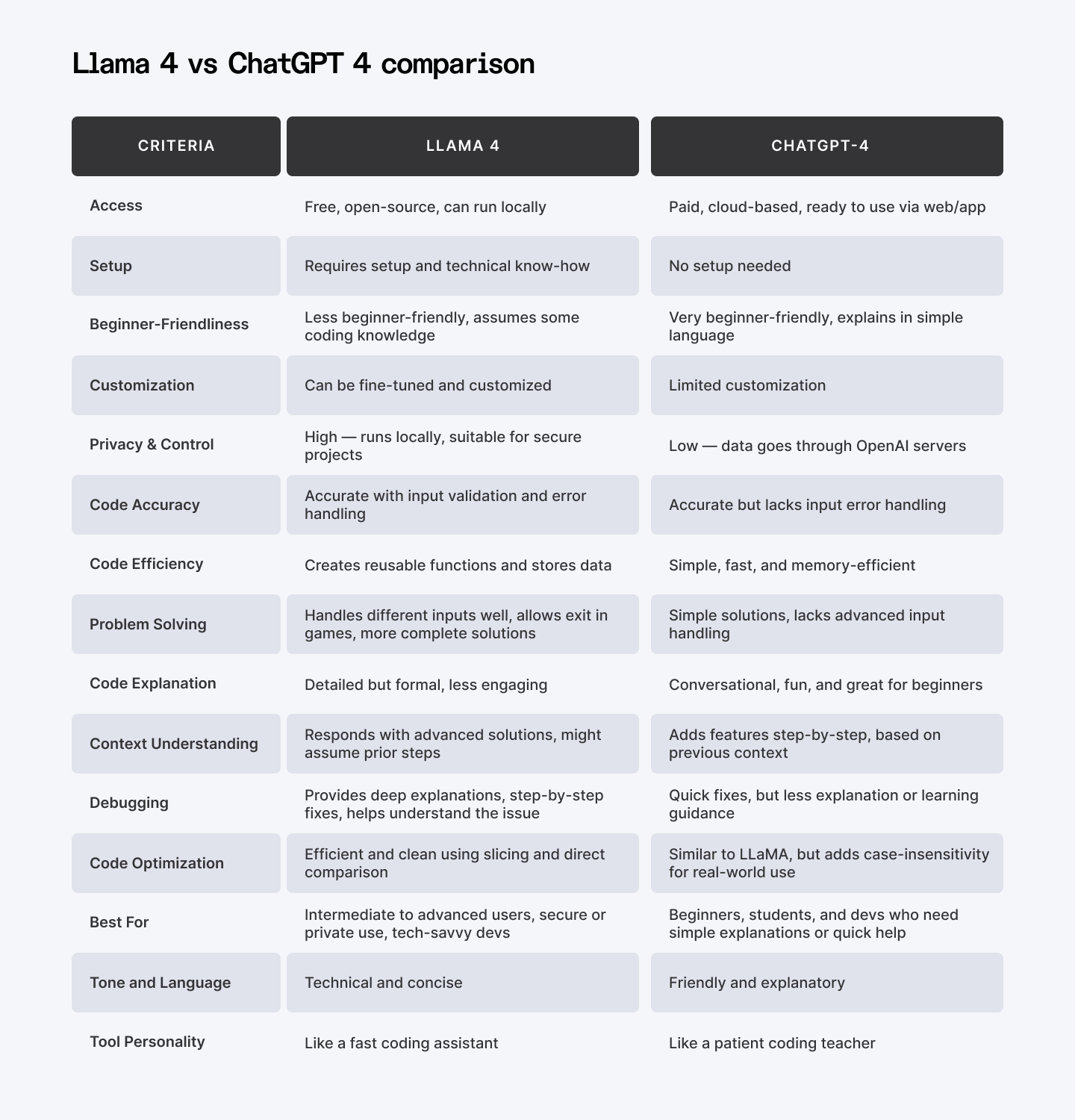
Here’s a quick Llama 4 vs ChatGPT 4 comparison chart:
| Criteria | LLaMA 4 | ChatGPT-4 |
| Access | Free, open-source, can run locally | Paid, cloud-based, ready to use via web/app |
| Setup | Requires setup and technical know-how | No setup needed |
| Beginner-Friendliness | Less beginner-friendly, assumes some coding knowledge | Very beginner-friendly, explains in simple language |
| Customization | Can be fine-tuned and customized | Limited customization |
| Privacy & Control | High — runs locally, suitable for secure projects | Low — data goes through OpenAI servers |
| Code Accuracy | Accurate with input validation and error handling | Accurate but lacks input error handling |
| Code Efficiency | Creates reusable functions and stores data | Simple, fast, and memory-efficient |
| Problem Solving | Handles different inputs well, allows exit in games, more complete solutions | Simple solutions, lacks advanced input handling |
| Code Explanation | Detailed but formal, less engaging | Conversational, fun, and great for beginners |
| Context Understanding | Responds with advanced solutions, might assume prior steps | Adds features step-by-step, based on previous context |
| Debugging | Provides deep explanations, step-by-step fixes, helps understand the issue | Quick fixes, but less explanation or learning guidance |
| Code Optimization | Efficient and clean using slicing and direct comparison | Similar to LLaMA, but adds case-insensitivity for real-world use |
| Best For | Intermediate to advanced users, secure or private use, tech-savvy devs | Beginners, students, and devs who need simple explanations or quick help |
| Tone and Language | Technical and concise | Friendly and explanatory |
| Tool Personality | Like a fast coding assistant | Like a patient coding teacher |
When to Use ChatGPT 4?
Use ChatGPT-4 when you are learning to code or want help understanding how things work. It explains code in simple terms, provides step-by-step instructions, and is great for beginners.
If you’re stuck on a problem or need help fixing errors, ChatGPT-4 can walk you through the solution clearly.
When to Use Llama 4?
Use LLaMA 4 when you already know the basics of coding and want quick, technical help. It gives shorter answers and focuses more on the code, rather than lengthy explanations.
This makes it better for experienced users who want to work faster without having to read too much.
Still Confused?
Use this quick decision checklist: which one should you use?
Ask yourself these questions:
- Do I want to learn coding from scratch? → ✅ Go with ChatGPT-4
- Do I need step-by-step explanations? → ✅ ChatGPT-4
- Am I building something private or secure? → ✅ Use LLaMA 4
- Do I want full control and customization? → ✅ LLaMA 4
- Do I want something that’s free and open-source? → ✅ LLaMA 4
- Am I okay with using a cloud-based paid tool? → ✅ ChatGPT-4
Both tools are powerful, but they serve different needs. ChatGPT-4 is like a helpful teacher, while LLaMA 4 is like a fast coding assistant.
Choose the one that matches your skill level and the kind of help you want.
…
For Developers: Join Index.dev to land high-paying remote developer jobs with top global companies. Work on exciting projects and grow your tech career from anywhere.
For Clients: Hire AI-savvy developers with Index.dev — get matched in 48 hours, access the top 5%, and start with a 30-day free trial.